Publish Date
6 June, 26
How to Create a Professional Bio Link Page in 2026 with CutMe Short
Yash Khandelwal

Social media platforms are excellent for building an audience, but most of them give you only one place to share a link.
Whether you’re a creator, marketer, business owner, freelancer, or agency, that single link often isn’t enough. You may want to share your website, latest content, social profiles, products, booking links, newsletters, and more.
That’s where a Bio Link page comes in.
With CutMe Short Bio Links, you can create a branded landing page that brings all your important destinations together under one shareable URL while also providing detailed analytics on visitor engagement.
In this guide, you’ll learn how to create, customize, share, and track your Bio Link page.
What Is a Bio Link Page?
A Bio Link page is a simple landing page that contains multiple links under a single URL.
Instead of constantly changing the link in your Instagram, TikTok, LinkedIn, X, or YouTube profile, you can direct visitors to one page that contains everything important.
A Bio Link page can include:
Website links
Product pages
Blogs and articles
Lead generation forms
Social media profiles
Booking pages
Newsletters
Videos and content
Think of it as your digital hub.
Why Use a Bio Link Page?
A Bio Link page helps you:
Share multiple destinations through one URL
Maintain consistent branding
Increase visibility of important content
Improve traffic distribution
Track visitor engagement
Promote campaigns more effectively
Instead of making visitors search for information, you place everything in one easily accessible location.
How to Create a Bio Link Page in CutMe Short
Creating a Bio Link page takes only a few minutes.
Step 1: Open the Bio Links Section
From your CutMe Short dashboard, navigate to the Bio Links section located alongside the Links and Import options.
Step 2: Click “Create Bio”
Select Create Bio to start building your page.
Step 3: Choose Your Bio Link Name
Enter a name for your Bio Link page.
This becomes the custom keyword (slug) in your Bio Link URL, so choose something brand-focused and easy to remember.
Step 4: Complete Your Profile
In the Profile section:
Upload a profile image
Add a title
Add a short description
This helps visitors understand who you are and what your page represents.
Step 5: Add Your Custom Links
Open the Links section and add your important destinations such as:
Website
Products
Blogs
Landing pages
Contact pages
CutMe Short automatically fetches website images for richer link previews, which can be disabled if preferred.
Step 6: Add Your Social Profiles
Navigate to Social Links and add your social media profiles including:
Facebook
Instagram
LinkedIn
X (Twitter)
YouTube
Your social icons will automatically appear on the Bio Link page.
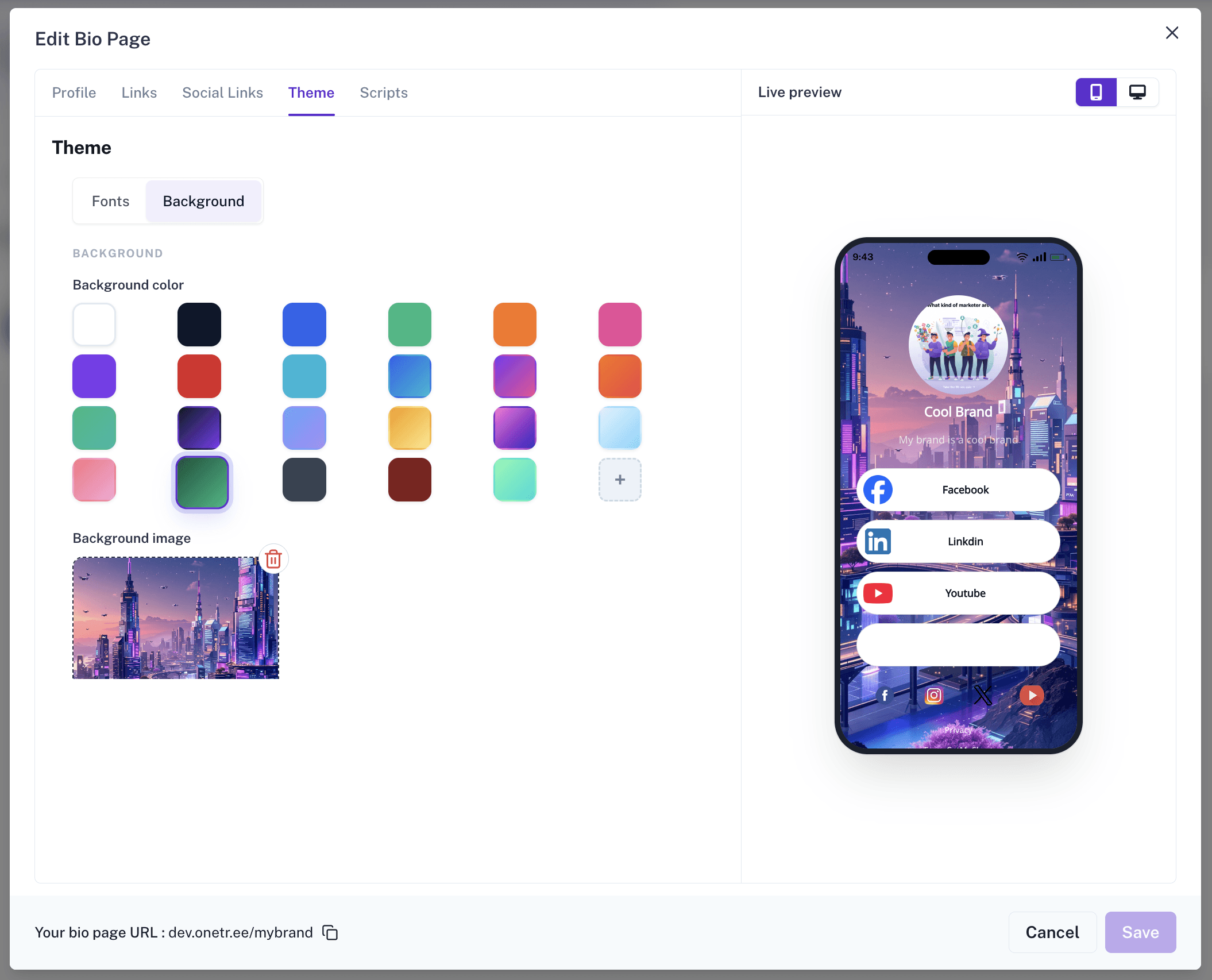
Step 7: Customize Your Theme
Open the Theme section to personalize your page.
You can customize:
Font family
Button style
Border radius
Font weight
Background color
Background image
This helps keep your Bio Link page aligned with your brand identity.
Step 8: Add Tracking Scripts (Optional)
Open the Scripts section if you’d like to add custom tracking or functionality.
Common examples include:
Google Analytics
Google Tag Manager
Facebook Pixel
Custom JavaScript
Step 9: Preview Your Page
Use the live preview panel on the right side to review your page.
Switch between:
Mobile View
Desktop View
This helps ensure your page looks great across devices.
Step 10: Save and Publish
Once you’re happy with your Bio Link page, click Save.
Your page is immediately ready to share.
Step 11: Share Through URL or QR Code
You can share your Bio Link page through:
Direct URL
Social media profiles
Email signatures
Marketing campaigns
You can also generate and share a QR Code directly from the Bio Link card beside the Edit button.
Understanding Bio Link Analytics
Creating a Bio Link page is only the beginning.
CutMe Short also provides analytics that help you understand how visitors interact with your page.
Simply expand your Bio Link card from the dashboard to access insights.
Available metrics include:
Total Clicks
The total number of clicks generated across the Bio Link page.
Bio Page Clicks
The number of visits to the page itself.
Custom Link Clicks
The number of clicks received by your custom links.
Social Link Clicks
The number of clicks received by social media profiles.
Unique Visitors
The number of individual visitors who viewed your page.
Social Link Performance
Track engagement for platforms such as:
Facebook
Instagram
X (Twitter)
YouTube
Custom Link Performance
Identify which links attract the most attention and engagement.
Clicks Over Time
Monitor traffic trends and audience activity over recent days.
These insights help you optimize your page and understand what resonates most with your audience.
Bio Link Use Cases
One of the biggest advantages of a Bio Link page is its flexibility. Whether you’re building a personal brand, growing a business, or running marketing campaigns, a single Bio Link page can become the central hub for everything important.
Content Creators and Influencers
Creators often have content spread across multiple platforms. Instead of asking followers to search for your latest YouTube video, newsletter, Instagram page, or affiliate recommendations, you can bring everything together in one place.
For example, a creator could use a Bio Link page to showcase:
Latest YouTube video
Newsletter signup page
Affiliate recommendations
Instagram and X profiles
Merchandise store
This creates a smoother experience for followers while increasing visibility across all channels.
Businesses and Startups
Many businesses need to direct visitors to multiple destinations depending on their goals.
For example, a SaaS company could use a Bio Link page to share:
Product website
Demo booking page
Pricing page
Customer case studies
LinkedIn company page
Instead of constantly updating links across social platforms, everything stays accessible from one branded destination.
Agencies and Consultants
Agencies frequently need to showcase credibility while making it easy for prospects to get in touch.
A Bio Link page can help centralize:
Portfolio projects
Client testimonials
Case studies
Discovery call booking link
Contact information
This makes it easier for potential clients to evaluate your services and take action.
Events, Conferences, and Communities
If you’re organizing an event, webinar, or community, a Bio Link page can act as a central information hub.
For example:
Registration page
Event schedule
Speaker information
Community group links
Post-event resources
This helps attendees find everything they need without searching through emails or social posts.
Best Practices for Better Results
To get the most value from your Bio Link page:
Use a professional profile image
Choose a memorable slug
Keep your branding consistent
Place important links near the top
Remove outdated links regularly
Add social profiles for credibility
Track performance through analytics
Use QR codes for offline promotions
Small improvements can significantly increase engagement and conversions.
Build Your Bio Link Page Today
Your audience should never struggle to find your content, products, or social profiles.
With CutMe Short Bio Links, you can create a professional branded destination, share it anywhere, monitor engagement, and continuously improve performance through analytics.
Whether you’re a creator, marketer, agency, freelancer, or business owner, a Bio Link page can become one of the most valuable assets in your online presence.