
AEO Studio Dashboard Explained: Every AI Visibility Metric and What It Means
Quick answer
The AI Visibility report in AEO Studio has five tabs. Overview shows your Visibility index (0–100, where 50 means level with your median competitor) and four core rates. Competitors compares you brand by brand. Prompts shows which questions mention you, with a count of missing prompts. Insights shows which sites AI cites and how it describes you. Actions & Manage turns findings into fixes.

Your first AI Visibility run is done and the dashboard is full of numbers. This guide explains every one of them: what it measures, how to read it, and what to do when it's low.
If you haven't set up tracking yet, start with How to set up AI Visibility tracking.
The report at a glance
Open AEO Studio in the left sidebar and click the AI Visibility tab. Above the report, the tracker header shows:
- Your brand name and domain on the left.
- On the right, the engines you're querying, when the last run happened, and two buttons: Run now (start a fresh run) and Settings (change prompts, competitors, engines and schedule).
Below that are five tabs:
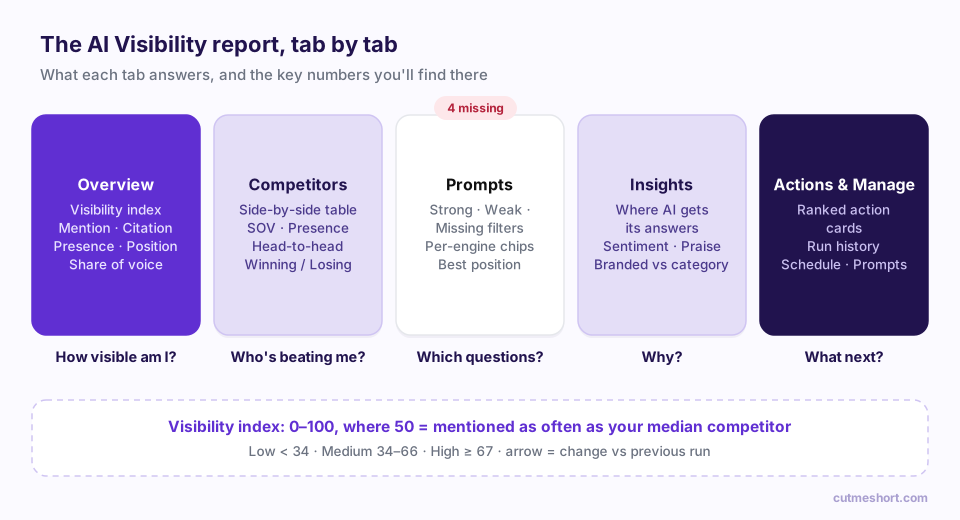
| Tab | The question it answers |
|---|---|
| Overview | How visible am I overall, and is it improving? |
| Competitors | Who's beating me in AI answers, and by how much? |
| Prompts | Which exact questions do I show up for, and which am I missing? |
| Insights | Where does AI get its information, and how does it describe me? |
| Actions & Manage | What should I do next, and how is my tracker set up? |
Unless stated otherwise, every metric describes your latest run.
Hover over the small info icon next to any card heading in the dashboard to see its definition in the app.
A quick vocabulary
Four words come up throughout:
- Answer: one response from one engine to one prompt. With 25 prompts, 3 engines and 3 samples, a run collects 225 answers.
- Mention: your exact brand name appears in an answer.
- Citation: an answer links to your website as a source.
- Branded prompt: a prompt that already contains your brand name. These are excluded from the headline rates, so an engine simply repeating your name back doesn't inflate your numbers.
Tab 1: Overview
Visibility index
The big gauge is your headline score, from 0 to 100. It compares how often AI engines mention you with how often they mention the median competitor you track:
- 50 means you're mentioned about as often as the typical competitor in your list.
- Above 50 means you're mentioned more than the typical competitor.
- Below 50 means you're mentioned less.
It's colour-banded Low (below 34), Medium (34–66) or High (67 or above). The small arrow beside it shows the change since your previous run.
Because the index is relative to your competitor list, changing competitors changes the benchmark. Compare scores over time with the same competitor set.
The four core rates
Below the gauge are four cards:
| Metric | What it means | Example |
|---|---|---|
| Mention rate | Share of AI answers that name your brand at least once | 30% = named in 3 of every 10 answers to non-branded prompts |
| Citation rate | Share of AI answers that link to your website as a source | Stronger than a mention, because AI is treating your site as evidence |
| Presence rate | Of the answers that name any tracked brand (you or a competitor), the share that includes you | Are you in the conversation when AI talks about your category? |
| Avg position | When AI lists brands, your average place in that list | 1.0 = usually named first. Lower is better |
How to read them together:
- High mention, low citation: AI knows you, but doesn't use your site as a source. Work on citable, answer-first content and structured data.
- Low mention, decent presence: when your category comes up you're often in the conversation, but many answers don't name any tracked brands at all. Look at the prompts where nobody is named.
- Good mention, weak position: you're included but listed late. Your positioning needs to be clearer and more widely repeated across the web.
Trend
From your second run onwards, Trend · last N runs plots your Visibility score, Mention rate and Citation rate across up to seven recent runs. Click a legend item to hide or show a line.
Look for direction across several runs rather than reacting to one. AI answers vary, so small run-to-run wobbles are normal.
By engine
By engine breaks your rates down per AI engine. Use the Mentions / Citations toggle to switch between them. This is where you'll spot, for example, that you're well known to one engine and invisible to another.
Share of voice
The donut shows share of voice: of all the times you and your tracked competitors were mentioned, the slice that's yours. All slices add up to 100%.
What's next
The last card shows your top two recommended actions. Click one, or click All actions, to jump to the Actions & Manage tab.
Tab 2: Competitors
Click Competitors for a side-by-side Competitor comparison table. Your own row is marked You.
| Column | What it means |
|---|---|
| Visibility index | Each brand's 0–100 score, benchmarked against the competitor median |
| Mentions | Total number of times the brand was named across all answers |
| Presence | Share of answers that mention the brand at least once |
| Position | Average place in the list when AI names several brands; lower is better |
| SOV | Share of voice: the brand's share of all tracked-brand mentions |
Below the table you'll see:
- Read: a one-line verdict on who leads on share of voice and by how much.
- Head-to-head cards for your first three rivals, each marked Winning, Losing or Open, with both visibility index scores.
To add or remove rivals, click Edit competitors. Changes apply from your next run.
Tab 3: Prompts (and what "missing" means)
The Prompts tab shows every tracked question and how each engine answered it. The red pill on the tab, for example 4 missing, counts the prompts where no engine mentioned your brand in the latest run. It's always visible, so 0 missing is the number you're working towards.
Use the filters at the top:
| Filter | Shows prompts where… |
|---|---|
| All | Every tracked prompt |
| Strong | Every engine mentioned you |
| Weak | Some engines mentioned you, others didn't |
| Missing (N) | No engine mentioned you |
Prompts are grouped by topic. Each row shows:
- Prompt: the question, with a Branded label if it contains your name.
- Intent: Discovery, Comparison, Recommendation, Alternative or How-to.
- Engines: one chip per engine. A filled green chip means you were cited, a green ring means you were mentioned, and a red ring means you weren't mentioned.
- Pos: your best position across engines.
Click any prompt to open its detail view, which shows each engine's result (Cited, Mentioned or Not mentioned) and your position in that engine's answer.
Start with the Missing filter. Each missing prompt is a buyer question where you're absent from the answer. Group them by topic: if most of your missing prompts sit in one topic, that's where to focus your next content.
Tab 4: Insights
Where AI gets its answers
This table lists the websites AI engines cited when answering your prompts. It's one of the most actionable views in AEO Studio.
| Column | What it means |
|---|---|
| Source | A domain AI cited as a source |
| Citations | How many times it was cited in the latest run |
| Share | Its share of all citations, i.e. how influential it is for your topics |
| Cites you | ✓ if at least one cited page on that domain mentions your brand; ✗ if it doesn't |
| Also cites | Competitors mentioned on that domain's cited pages |
Domains marked Placement target are influential sites that don't yet mention you. A ✗ in Cites you next to competitors in Also cites is a clear opportunity: that site shapes AI answers in your category, and it's talking about your rivals, not you.
How AI describes your brand
An AI-written summary of how engines describe you across the latest run, with two lists: Praise (what they highlight) and Areas to improve (where they hedge or raise doubts). Compare it with how you want to be positioned.
Sentiment
Of the answers that mention you, the share that is Positive, Neutral or Negative. Neutral is normal for factual answers. A rising negative share is worth investigating: open How AI describes your brand and look at the areas to improve.
Branded vs category
Two numbers side by side:
- Branded prompts — mentioned: how often you appear when the question names you.
- Category prompts — mentioned: how often you appear when it doesn't.
Branded visibility is usually high. Category visibility is where growth is: those are the questions asked by buyers who haven't decided on you yet.
Tab 5: Actions & Manage
Actions
Each card is a recommended action based on your latest run, marked high, medium or low impact. A card has:
- Finding: what the data shows.
- Why it matters: what it's costing you.
- How to fix: the concrete step to take.
- Evidence: example prompts where the problem showed up.
Typical actions include "Mentioned but rarely cited as a source", "Third-party domains dominate citations", a topic gap for a specific topic, or a competitor that has a higher share of voice. For a practical playbook on acting on them, read How to improve your AI visibility with AEO Studio actions.
Run history
A table of past runs with Status (complete, partial or failed), Trigger (Scheduled or Manual), Score, Date and Progress (answers collected out of the total). A partial run means some answers couldn't be collected; its results still count, but with less data.
Schedule and prompt library
- Schedule shows your schedule, engine count and samples per prompt. Click Run now for an immediate run, or Edit schedule to change the settings.
- Prompt library shows how many active prompts you track across how many topics. Click Edit prompts to change them; to generate a new set, use Regenerate in Settings → Prompts.
How often should you check?
- Weekly, after each automatic run: glance at the Visibility index, the missing count and any new actions.
- Monthly: look at the trend, compare competitors and plan content around topic gaps and placement targets.
- After a big change, such as publishing a major guide or earning coverage on a key site: wait a little for engines to pick it up, then click Run now.
Frequently asked questions
What is a good Visibility index?
50 means you're on par with the median competitor you track. Anything in the High band (67 or above) means you're mentioned noticeably more often than your typical competitor.
Why is my mention rate different from my presence rate?
Mention rate is measured across all answers to non-branded prompts. Presence rate only counts answers that name at least one tracked brand. If many answers name no tracked brands at all, presence will be much higher than mention rate.
Why did my score change when I didn't do anything?
AI answers are probabilistic and engines update their models and sources regularly. Small changes between runs are normal. Look at the trend across several runs.
What does "4 missing" on the Prompts tab mean?
It means that in the latest run, there were four prompts where no AI engine mentioned your brand in any answer. Click Prompts and use the Missing filter to see them.
Are branded prompts included in my headline numbers?
No. Mention rate, citation rate and the other headline metrics are calculated from non-branded prompts only. Branded results appear in the Branded vs category card on the Insights tab.