
How to Improve Your AI Visibility: A Practical Playbook Using AEO Studio Actions
Quick answer
To improve your AI visibility, work in a loop: pick the highest-impact action in AEO Studio's Actions & Manage tab, fix it with answer-first content, technical fixes or third-party placements, then re-measure with Run now or your next weekly run. The fastest wins usually come from getting mentioned on the sites AI already cites and publishing direct answers to your missing prompts.

AEO Studio tells you where you stand. This guide is about moving the numbers.
It's organised around the actions AEO Studio recommends, because each one points at a specific kind of problem with a specific kind of fix. You don't need to do everything at once. Pick the highest-impact action, ship a fix, measure, repeat.
The improvement loop
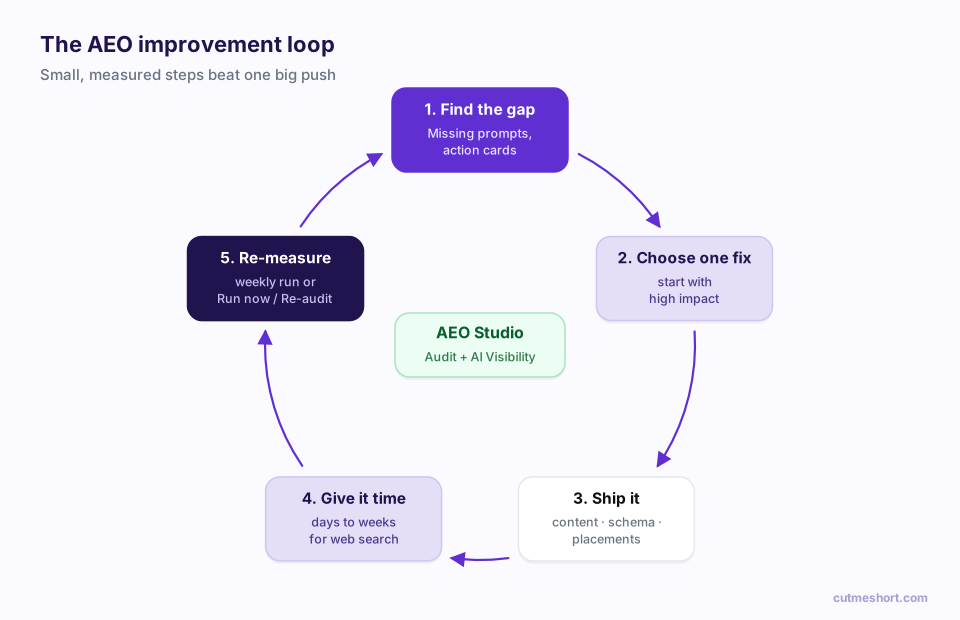
- Find the gap. Open AEO Studio → AI Visibility → Actions & Manage, and check the Missing filter on the Prompts tab.
- Choose one fix. Start with a high impact action card.
- Ship it. Publish the content, fix the markup or pitch the placement.
- Give it time. Engines that search the web, such as Perplexity, can pick up changes within days or weeks. What models "know" from training changes more slowly.
- Re-measure. Let your weekly run happen, or click Run now. Re-audit with Re-audit now after technical fixes.
Keep a simple change log with the date and what you shipped. When your trend moves, you'll know why.
Where to find your actions
In AEO Studio, there are two to-do lists:
- Audit tab → Your AEO to-do list: fixes for your website, ranked from top to bottom. Each row expands into Why it matters and How to do it.
- AI Visibility tab → Actions & Manage: fixes for your presence in AI answers. Each card has a Finding, Why it matters, How to fix and the Evidence prompts that triggered it.
Here's what to do about each kind of action.
1. "Brand is invisible in AI answers"
What it means: AI engines rarely or never name you for the questions in your category.
What to do:
- Make sure the basics are in place: run the Audit, unblock AI crawlers in
robots.txtand fix any high-priority items. - Publish a clear "what we do" page: in two sentences, who you serve, what you do and how you're different, in plain language AI can quote.
- Get listed where your category is discussed: industry directories, review platforms, "best tools for X" roundups and comparison articles.
- Use the same brand name everywhere. Mentions are matched on your exact name, and engines build their picture of you from consistent mentions.
2. Missing prompts and topic gaps
What it means: specific buyer questions, or whole topics, where competitors are named and you aren't. You'll see them as Topic gap: "your topic" action cards and in the Missing filter on the Prompts tab.
What to do: write the page that answers that question better than anything else on the web.
- Answer in the first two sentences. Then go deep.
- Match the question's intent. For "best X for Y" questions, write a genuinely useful comparison, including competitors, and explain when you're the right choice. For "how do I…" questions, write numbered steps.
- Use structure AI can lift: question-style headings, short paragraphs, tables, lists and an FAQ.
- Show evidence: real numbers, examples, author names and dates.
One great page per missing question beats ten thin ones. AI engines quote pages that answer clearly and completely.
3. "Mentioned but rarely cited as a source"
What it means: AI knows your name, but links to other sites, not yours, when it backs up its answer.
What to do:
- Make your pages citable. Lead with direct, factual statements. Put definitions, statistics and steps in plain HTML text, not in images or behind tabs that need JavaScript.
- Add structured data. Organization, Product, Article and FAQ schema help engines understand what each page is. Your audit's Structured Data score shows where you stand.
- Publish original data. Benchmarks, surveys and research reports get cited because nobody else has the numbers.
- Keep pages fresh. Visible "last updated" dates and current information make a page a safer source.
4. "Third-party domains dominate citations"
What it means: the answers in your category are built mostly from other people's websites, such as review sites, forums, publishers and directories.
This is where the Insights → Where AI gets its answers table becomes your target list. Sort by Citations and look for domains with a ✗ under Cites you, especially those marked Placement target or listing your competitors under Also cites.
What to do, by type of site:
| Type of cited site | How to earn a mention |
|---|---|
| Review platforms (G2, Capterra, Trustpilot…) | Claim your profile, complete it fully and ask happy customers for reviews |
| "Best tools" roundups and comparisons | Contact the author with a clear pitch and accurate product information; offer a demo account |
| Community forums (Reddit, Quora, niche communities) | Contribute genuinely helpful answers as a named team member, following each community's rules |
| Industry publications and newsletters | Pitch original data, expert commentary or a guest article |
| Partner and integration pages | Ask partners to list you on their integrations or partners page |
| YouTube and podcasts | Appear as a guest or publish tutorials; transcripts are often indexed |
Don't fake it. Undisclosed paid placements, review manipulation and spammy forum posts can damage trust with people and platforms, and they rarely last.
5. "[Competitor] has higher share of voice"
What it means: a named rival is mentioned more often than you across your tracked prompts.
What to do:
- Open the Competitors tab and check the head-to-head card for that rival.
- On the Insights tab, look at Also cites: which sites mention them and not you?
- Publish an honest comparison page ("You vs Competitor") that explains the differences fairly. AI engines frequently cite fair comparisons.
- Target the sites from step 2 with the placement tactics above.
6. "Mentions lack prominence" and "Brand named late among competitors"
What it means: you're included in answers, but in passing or near the end of the list.
What to do:
- Sharpen your positioning. If you can't describe in one sentence what you're best at, AI can't either. Pick a clear "best for…" claim and repeat it consistently on your site, profiles and listings.
- Win the specific use case. Engines often name a brand first when it's clearly the specialist for the exact need in the question.
- Collect proof: case studies, awards and customer quotes that back up your positioning.
7. "Negative sentiment in AI-generated mentions"
What it means: some answers that mention you are negative.
What to do:
- On the Insights tab, read How AI describes your brand, especially Areas to improve.
- Find the source of the perception: old reviews, an outdated pricing page, a forum thread about a fixed problem.
- Fix the real issue if there is one, then update the public record: refresh the outdated pages, respond to reviews and publish what changed.
8. "[Engine] lags far behind [best engine]"
What it means: one engine mentions you far less than another.
What to do: engines draw on different sources and update at different speeds.
- If a web-searching engine like Perplexity lags, focus on fresh, crawlable pages and placements on the sites that engine cites.
- If an engine relies more on what it learned in training, steady, consistent mentions across the web over time are what count.
- In all cases, check the audit's AI Crawler Access category to be sure you aren't blocking that engine's crawler.
Don't forget the links you share
Every link you share is a small, public piece of evidence about your brand. Sharing campaign links on your own branded domain, such as go.yourbrand.com/guide instead of a generic shortener, keeps your name on every post, newsletter and QR code. It isn't a ranking switch, but it builds the consistent, recognisable brand signal AEO rewards.
When AI answers, social posts and partner pages start sending traffic, CutMe Short Events shows which links turned clicks into leads and sales.
A 30-day starter plan
| Week | Focus |
|---|---|
| Week 1 | Run the Audit and fix every HIGH item, especially crawler access and structured data. |
| Week 2 | Pick your top three Missing prompts and publish one answer-first page for each. |
| Week 3 | Take the top five domains in Where AI gets its answers that don't cite you, and start outreach. |
| Week 4 | Publish one fair comparison page against your strongest competitor. Re-audit, review your weekly runs and pick the next actions. |
Frequently asked questions
How long does it take to improve AI visibility?
Engines that search the web can reflect new content and mentions within days to weeks. Changes to what models know from training take longer, often months. Track the trend over several weekly runs.
Which action should I start with?
Start with the high impact cards in Actions & Manage and any HIGH items in the audit's to-do list. Technical blockers, such as AI crawlers being disallowed, come first, because nothing else works if engines can't read your site.
Does more content always mean more visibility?
No. One clear, complete, well-structured answer to a real buyer question is worth more than many thin pages. Quality and third-party mentions matter more than volume.
How do I know if a fix worked?
Look at the prompts it targeted on the Prompts tab after your next runs, the relevant category in your next audit, and your Trend over several runs.