Introducing AEO Studio: See How AI Talks About Your Brand, and Fix It
Quick answer
AEO Studio is a workspace inside CutMe Short that shows how visible your brand is to AI answer engines and what to do about it. The Audit tab scores your website's AI readiness out of 100. The AI Visibility tab asks AI engines your customers' real questions every week and measures whether you're mentioned, cited and ahead of competitors. Both turn their findings into a ranked fix list.

Every week, millions of buying decisions start with a question typed into an AI assistant. "What's the best CRM for a five-person sales team?" "Which running shoe is good for flat feet?" "Bitly alternatives with a custom domain?"
The assistant answers with a short list of brands. Yours is either on it or it isn't, and until now most teams had no practical way to find out which, let alone why.
AEO Studio is our answer to that. It lives inside your CutMe Short workspace and does three things:
- Audits your website the way an AI engine reads it, and scores it out of 100.
- Tracks your AI visibility: how often AI engines mention you, cite you and rank you against named competitors, week after week.
- Turns both into a to-do list ranked by impact, so you always know what to fix next.
This post is the overview. Each part has its own step-by-step guide, linked below.
Where to find AEO Studio
Open CutMe Short and look at the left sidebar. Under the Workspace section, below Links, Bio Pages, Domains and Events, you'll see AEO Studio.
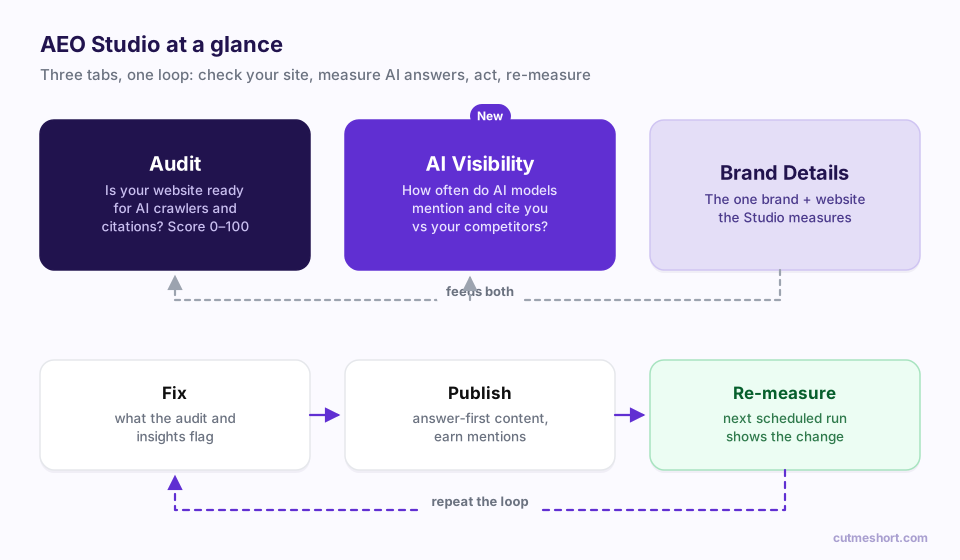
Click it and you'll land on the AEO Studio page, which has three tabs across the top:
| Tab | What it's for |
|---|---|
| Audit | Scores how ready your website is for AI crawlers and citations, and lists the fixes |
| AI Visibility (marked New) | Measures how AI engines answer your customers' questions about your category, and where you stand |
| Brand Details | The brand name, domain and website URL that everything in the Studio measures |
AEO Studio is available on plans that include it. If you don't see it in your sidebar, your current plan doesn't include AEO Studio yet. Check your plan in Settings or contact our team.
Part 1: Brand Details, one brand per workspace
Everything starts with your brand. In Brand Details you enter three things: Brand name, Domain and Website URL.
One rule matters here: these details lock once your first audit runs (or once you create an AI Visibility tracker). Every score, finding and history entry belongs to that one website, so the Studio keeps exactly one website per workspace. If you need to audit a different site, create a separate workspace for it.
Part 2: The Audit, how readable is your site to AI?
The Audit checks your website the way an AI does and asks three questions: can it read you, can it quote you, and can it trust you? It takes about a minute and returns:
- An overall score out of 100 with a rating: Excellent, Good, Average, Needs work or At risk.
- Six category scores: Citability, Content & E-E-A-T, Structured Data, AI Crawler Access, Technical Foundations and Brand Authority. Each is weighted by how much it counts toward the total.
- Your AEO to-do list: every issue ranked by priority, each with a plain-English why it matters and how to do it.
- A Watch list of things that don't need fixing yet, and an Already done list of checks you're passing.
Want to see one before you run your own? The Audit tab has a See a sample report button that opens a demo report.
Step-by-step guide: How to register your brand and run your first AEO audit
Part 3: AI Visibility, what do AI engines actually say?
The audit tells you whether your site is ready. AI Visibility tells you whether it's working.
Here's how it works:
- You define the scope. Pick the topics (markets) you want to be recommended in and the competitors you want to be measured against. AEO Studio pre-fills suggestions from your Brand Details.
- AEO Studio writes the questions. It generates a set of prompts, 25 by default, that mirror what real buyers ask: discovery, comparison, recommendation, alternative and how-to questions. You review and edit them before anything runs.
- It asks several AI engines, several times. By default it asks the models behind ChatGPT (OpenAI), Perplexity and Claude, with Gemini, Grok and DeepSeek available too. Each prompt is asked more than once (3 samples by default), because AI answers vary from one run to the next.
- It measures every answer. Were you mentioned? Was your website cited as a source? Where did you appear in the list? How were you described?
- It repeats weekly, automatically, unless you choose manual runs.
The results land in a report with five tabs: Overview, Competitors, Prompts, Insights and Actions & Manage. Your headline number is the Visibility index, a 0–100 score where 50 means you're on par with the typical (median) competitor you track.
Step-by-step guides:
- How to set up AI Visibility tracking: topics, competitors, engines and schedule
- AEO Studio dashboard explained: every metric and what it means
Part 4: From charts to action
A dashboard that only tells you you're losing isn't much help. Both halves of AEO Studio end in actions:
- The Audit ends with Your AEO to-do list, ranked top to bottom.
- AI Visibility ends with Actions & Manage: cards that each name a finding, explain why it matters and describe how to fix it, with the exact prompts as evidence.
Typical actions include publishing answer-first content for a topic where competitors are named and you aren't, earning a mention on a site AI engines keep citing, or fixing structured data so engines can cite your pages.
Guide: How to improve your AI visibility with AEO Studio actions
How AEO Studio fits with the rest of CutMe Short
AEO Studio answers "Does AI recommend us?" The rest of CutMe Short answers "And what happened next?"
- Branded short links on your custom domain keep your brand on every link you share, the kind of consistent signal AEO rewards.
- Events connects clicks to leads and sales, so the traffic you earn, from AI or anywhere else, turns into revenue you can attribute. See how click, lead and sale tracking works.
A few honest notes on how it measures
We'd rather you trust the numbers than be impressed by them, so here's what's under the hood:
- AEO Studio queries AI models through their APIs, not by scraping the consumer apps. Answers in the ChatGPT or Claude apps can differ slightly, because those apps may add web browsing, memory or personalisation. Among the engines, Perplexity searches the web for every answer, which is why it tends to produce the most citations.
- Your brand is matched by its exact name. Abbreviations, nicknames and misspellings aren't counted as mentions.
- Headline rates exclude prompts that already name your brand. If a question mentions you, an engine repeating your name back doesn't count as visibility.
- AI answers vary. That's why every prompt is sampled more than once and why trends across several runs matter more than any single result.
Frequently asked questions
What is AEO Studio?
AEO Studio is CutMe Short's answer engine optimization workspace. It audits your website's readiness for AI engines, tracks how often AI engines mention and cite your brand compared with competitors, and gives you a ranked list of fixes.
Which AI engines does AEO Studio track?
You can choose OpenAI (ChatGPT), Perplexity, Claude, Gemini, Grok and DeepSeek. OpenAI, Perplexity and Claude are switched on by default.
How often does AEO Studio check AI answers?
By default AI Visibility re-checks every prompt once a week, automatically. You can switch to Manual only and use Run now whenever you like. The website audit runs whenever you click Re-audit now; AEO Studio suggests re-auditing every 30 days or right after you ship a fix.
Can I track more than one website?
Each workspace tracks exactly one website, and the brand details lock after the first audit. To track another website, create another workspace.
Do I need to write the prompts myself?
No. AEO Studio generates a prompt set from your topics, competitors and Brand Details. You can edit, switch off, remove or add custom prompts before the first run and at any time afterwards in Settings.
What is a good Visibility index?
The index runs from 0 to 100, and 50 means you're mentioned about as often as the median competitor you track. A score of 67 or above is labelled High, 34–66 Medium and below 34 Low.