
How to Register Your Brand and Run Your First AEO Audit in AEO Studio
Quick answer
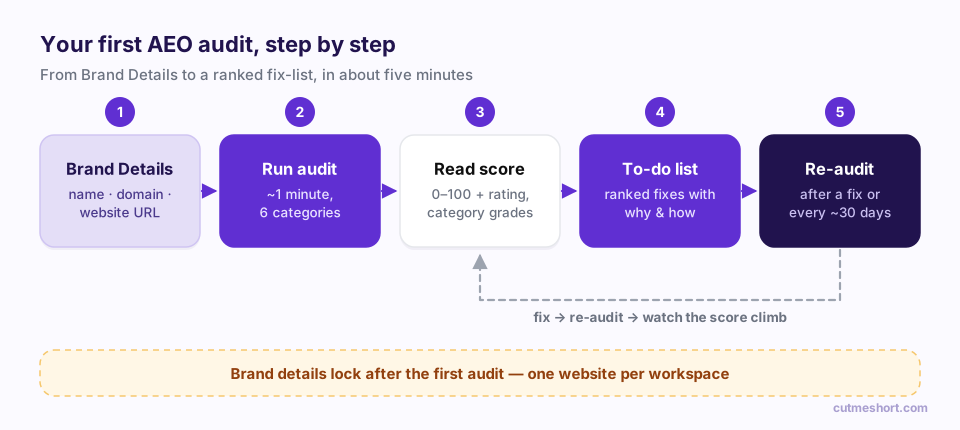
To run your first AEO audit, open AEO Studio from the left sidebar, go to the Brand Details tab, enter your brand name, domain and website URL, then click Save & run first audit. About a minute later you get a score out of 100, six weighted category scores and a ranked to-do list explaining what to fix and how. Double-check the URL first: brand details lock after the first audit.

Before you can improve how AI engines talk about your brand, you need to know whether they can read your website properly at all. That's what the Audit in AEO Studio is for.
This guide walks you through registering your brand, running your first audit and turning the report into a plan. It takes about five minutes, most of it reading.
New to AEO Studio? Start with the introduction to AEO Studio for the big picture.
Before you start: one website per workspace
AEO Studio measures one website per workspace, and the brand details lock permanently once your first audit runs. Every score, finding and history entry from then on belongs to that website.
So before you click anything, decide:
- Which brand name do people use when they talk about you? Use that, spelled the way customers spell it.
- Which website should represent the brand? Usually it's your main marketing site's homepage.
If you manage several brands or clients, give each one its own CutMe Short workspace.
Step 1: Open AEO Studio
- Log in to CutMe Short.
- In the left sidebar, find the Workspace section and click AEO Studio. It sits below Links, Bio Pages, Domains and Events.
- You'll land on the Audit tab. On your first visit it shows a page headed "Get your brand recommended by AI", with two buttons:
- Set up my brand → takes you to the Brand Details form.
- See a sample report opens a demo report so you can see what you'll get.
If you've never seen an AEO audit before, click See a sample report first. It uses demo data, so nothing in it is about your website. Click Exit sample to come back.
Step 2: Fill in Brand Details
Click Set up my brand →, or click the Brand Details tab at the top of the page. You'll see a card titled "Brand details" with three required fields:
| Field | What to enter | Example |
|---|---|---|
| Brand name | The name customers use, exactly as it's usually written | Acme Analytics |
| Domain | Your website's domain | acmeanalytics.com |
| Website URL | The full address of the page to audit, usually your homepage | https://www.acmeanalytics.com |
Underneath, a warning reminds you: "These details lock permanently once your first audit runs — one website per workspace. Double-check the URL before auditing."
The brand name matters beyond the audit. When you later set up AI Visibility, AEO Studio counts a "mention" only when an AI answer contains this exact name. If people say "Acme" more often than "Acme Analytics", think carefully about which one to use.
Then choose one of the two buttons:
- Save changes saves the brand without auditing. Use this if you want to review the details with a colleague first. You'll see the message "Brand details saved."
- Save & run first audit saves the brand, switches to the Audit tab and starts the audit straight away.
Step 3: Let the audit run (about a minute)
You'll see "Auditing yourdomain.com…" and a checklist of what's happening:
- Fetched your homepage
- Checked AI crawler access (robots.txt · llms.txt)
- Reading your content like an AI would…
- Looking for structured data
- Scoring six categories
It usually takes about a minute. If the audit can't finish, for example because your site blocked the request or timed out, you'll see an error message and can simply try again.
The audit reads the page at your Website URL as it's delivered by your server, the way most AI crawlers do. Content that only appears after JavaScript runs in a browser may not be seen. If your homepage is built as a client-side app, that is worth knowing in itself, because many AI crawlers can't see it either.
Step 4: Read your score
When the audit finishes, the report opens. On the right you'll see your overall score out of 100 in a ring, with a rating:
| Score | Rating | What it means |
|---|---|---|
| 85–100 | Excellent | AI can read, quote and trust your site. Keep it fresh. |
| 70–84 | Good | Solid foundations; a few targeted fixes from excellent. |
| 55–69 | Average | AI can find you but rarely picks you. Fix the big gaps first. |
| 40–54 | Needs work | A normal starting point; most sites start between 30 and 55. |
| 0–39 | At risk | AI is likely skipping your site. Start with the critical fix. |
Don't panic about a low first score. Most sites have never been checked against these criteria, and the most common fixes, such as letting AI crawlers in or adding structured data, are quick.
Step 5: Understand the six category scores
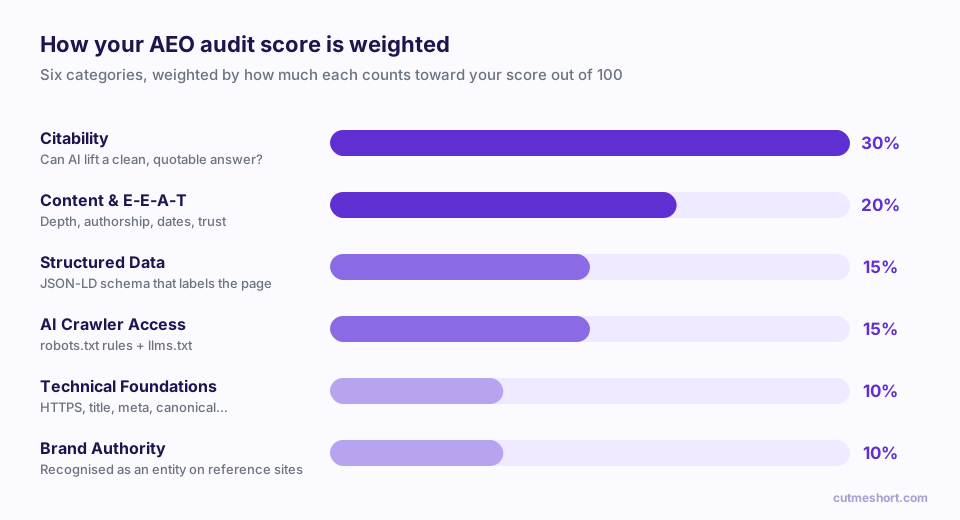
Below the score, Category scores breaks the total into six weighted categories. Hover the small i next to any category to see its description.
| Category | Weight | What it looks at |
|---|---|---|
| Citability | 30% | How easy it is for an AI to lift a clean, quotable answer from your page: clear headings, direct statements, lists and concise paragraphs. |
| Content & E-E-A-T | 20% | Depth, authorship, dates and trust signals, the things that show experience, expertise, authority and trust. |
| Structured Data | 15% | Schema markup (JSON-LD) that tells machines exactly what the page and your organisation are. |
| AI Crawler Access | 15% | Whether your robots.txt lets AI crawlers in, and whether you publish an llms.txt file. |
| Technical Foundations | 10% | Basics machines rely on, such as HTTPS, a title, a meta description, a canonical URL, a mobile viewport and security headers. |
| Brand Authority | 10% | How established your brand is as an entity on trusted reference sites. |
Each category also gets a grade (Excellent, Good, Needs work or Missing) and, from your second audit onwards, a change arrow showing whether it moved.
Which AI crawlers are checked?
The AI Crawler Access category checks your robots.txt rules for the major AI user agents, including OpenAI's GPTBot, OAI-SearchBot and ChatGPT-User, Anthropic's ClaudeBot, PerplexityBot, Google-Extended, CCBot (Common Crawl) and others. If you block one of them, that engine may not be able to read or cite your pages.
Step 6: Work through your AEO to-do list
This is the most useful part of the report. Your AEO to-do list shows every issue, ranked; the header tells you how many there are (for example "6 actions, ranked — work top to bottom").
Each row shows:
- The fix in plain words, for example "Implement JSON-LD structured data".
- A priority: HIGH, MEDIUM or LOW.
- Because…: the finding that triggered it and which category it affects.
Click any row to expand it and see:
- Why it matters: what the problem costs you in AI answers.
- How to do it: the concrete steps to fix it.
Work top to bottom. The list is ordered so the fixes that matter most come first.
Two smaller cards sit below the list:
- Watch list — no fix needed yet: informational findings that aren't problems today but are worth keeping an eye on.
- Already done: the checks you pass, grouped by category. The advice here is simple: don't break them.
Step 7: Export and share the report
Use the Export menu on the score card to share results with your developer, agency or boss:
- Copy as Markdown: paste into a ticket, doc or chat.
- Download .md: save a file named after your brand.
- Print / Save as PDF: a clean printable version.
The Markdown export includes every open issue with its why and how, plus an estimated points impact for each fix, which makes it a ready-made brief for whoever implements the changes.
Step 8: Fix, then re-audit
On the left of the report you'll find three cards:
- Audited website: the domain being audited.
- Audit history: your last five audits with scores and the change between them.
- Next re-audit: a suggested date 30 days after your last audit.
AEO Studio suggests re-auditing every 30 days, or right after you ship a fix, because AI answers reshuffle often. Re-audits don't run on their own: click Re-audit now whenever you're ready. Your new score and its change since the last audit appear in the score card and the history.
Quick wins that often lift a first score
These are the fixes we see come up most often. Your to-do list will tell you which apply to you.
- Unblock AI crawlers. Check that
robots.txtdoesn'tDisallowGPTBot, ClaudeBot, PerplexityBot or Google-Extended unless you mean to. - Publish an
llms.txtfile at the root of your site: a short Markdown summary of who you are with links to your most important pages. - Add Organization schema (JSON-LD) to your homepage with your name, logo, URL and social profiles, and add Article, Product or FAQ schema where it fits.
- Lead with the answer. Put a one- or two-sentence description of what you do, and for whom, near the top of the page in plain text.
- Show who's behind it. Author names, dates, an about page and contact details are trust signals for people and machines alike.
Frequently asked questions
How long does an AEO audit take?
About a minute. The audit reads your page, your robots.txt and your llms.txt file, then scores six categories.
Why can't I edit my brand details?
Brand details lock after your first audit, or once you've created an AI Visibility tracker, because every score and history entry belongs to that website. To audit a different website, create a new workspace.
Does the audit check every page on my site?
No. It audits the page at your Website URL, usually your homepage, along with site-wide files such as robots.txt and llms.txt. Fixes to shared templates (headers, schema, meta tags) usually improve the rest of your site too.
Does the audit run automatically?
No. Click Re-audit now whenever you've shipped changes. AEO Studio shows a suggested next date 30 days after your last audit as a reminder.
Is a high audit score enough to appear in AI answers?
It's the foundation, not the finish line. The audit measures whether AI can read, quote and trust your site. Whether AI engines actually recommend you is measured separately in the AI Visibility tab. See how to set up AI Visibility tracking.