How to Create a Professional Bio Link Page in 2026 with CutMe Short
A step-by-step guide to building a branded Bio Link page with CutMe Short so you can share all your important links from one beautiful, trackable URL.

Social media platforms are excellent for building an audience, but most of them give you only one place to share a link.
Whether you are a creator, marketer, business owner, freelancer, or agency, that single link is often not enough. You may want to share your website, latest content, social profiles, product pages, booking links, newsletters, lead forms, and more.
That is where a Bio Link page helps.
With CutMe Short Bio Links, you can create a branded landing page that brings all your important destinations together under one shareable URL. You can also track visitor engagement with built-in analytics, so you understand what people are clicking and which content is performing best.
Quick Answer
A Bio Link page is a simple, shareable landing page that contains multiple important links under one URL. With CutMe Short, you can create a branded Bio Link page, add custom links, add social profiles, customize the design, share it through a URL or QR code, and track clicks, visits, and engagement from one dashboard.
What You Will Learn
By the end of this guide, you will know how to:
- Create a Bio Link page in CutMe Short
- Add your profile image, title, and description
- Add website links, product links, landing pages, and social profiles
- Customize your Bio Link page design
- Preview your page on mobile and desktop
- Publish and share your Bio Link page
- Track clicks, visits, social link performance, and unique visitors
What Is a Bio Link Page?
A Bio Link page is a simple landing page that contains multiple links under a single URL.
Instead of constantly changing the link in your Instagram, TikTok, LinkedIn, X, YouTube, or other social media profile, you can direct visitors to one page that contains everything important.
A Bio Link page can include:
- Website links
- Product pages
- Blogs and articles
- Lead generation forms
- Social media profiles
- Booking pages
- Newsletters
- Videos and content
- Campaign landing pages
- Contact pages
Think of it as your digital hub. Your audience gets one clean link, and you get one central place to manage what they see.
Why Use a Bio Link Page?
A Bio Link page helps you make your online presence easier to navigate.
Instead of sending people to one destination at a time, you can give them a single branded page that contains everything they may need.
Key Benefits
| Benefit | Why It Matters |
|---|---|
| Share multiple links from one URL | Useful for social profiles where only one link is allowed |
| Maintain consistent branding | Your page can match your business, creator, or campaign identity |
| Increase visibility of important content | Place your most important links at the top |
| Improve traffic distribution | Send visitors to different pages based on their intent |
| Track visitor engagement | See which links and channels get the most clicks |
| Promote campaigns faster | Update one page instead of editing links across platforms |
| Use offline promotions | Share your Bio Link page with a QR code |
A Bio Link page is especially useful when you want to reduce friction. Visitors should not have to search through multiple platforms to find your content, offers, or contact details.
How to Create a Bio Link Page in CutMe Short
Creating a Bio Link page in CutMe Short takes only a few minutes.
Follow these steps to build, customize, publish, and share your page.
Step 1: Open the Bio Links Section
From your CutMe Short dashboard, open the Bio Links section.
You will find it alongside options such as Links and Import.
This is where you can create and manage your Bio Link pages.
Step 2: Click “Create Bio”
Click Create Bio to start building your page.
This opens the Bio Link creation flow where you can define your page name, profile details, links, social profiles, theme, and tracking options.
Step 3: Choose Your Bio Link Name
Enter a name for your Bio Link page.
This name becomes the custom keyword, also called the slug, in your Bio Link URL.
For example, if your brand is called growthstudio, you may choose a slug like:
growthstudio
Your final Bio Link URL may look like:
https://cme.sh/growthstudio
Tips for Choosing a Good Bio Link Slug
- Keep it short
- Make it easy to remember
- Use your brand name if possible
- Avoid unnecessary numbers or special characters
- Choose something that looks professional when shared
A clean slug makes your Bio Link page easier to trust, remember, and promote.
Step 4: Complete Your Profile
In the Profile section, add the details that help visitors understand who you are.
You can add:
- Profile image
- Title
- Short description
Your profile section is the first thing many visitors will notice, so keep it clear and professional.
Example Profile
Title: CutMe Short
Description: Branded links, QR codes, Bio Links, and analytics for modern marketers.
A strong profile section quickly tells visitors what your page represents and why they should click your links.
Step 5: Add Your Custom Links
Open the Links section and add your important destinations.
You can add links such as:
- Website
- Products
- Blogs
- Landing pages
- Contact pages
- Demo booking pages
- Campaign offers
- Lead generation forms
- Newsletter signup pages
CutMe Short can automatically fetch website images for richer link previews. You can disable this option if you prefer a cleaner or more minimal design.
Best Practice
Place your most important link near the top.
For example, if you are running a campaign, keep your main offer, product page, or booking link as the first link on the page.
Step 6: Add Your Social Profiles
Go to Social Links and add your social media profiles.
You can add platforms such as:
- X, formerly Twitter
- YouTube
Your social icons will automatically appear on your Bio Link page.
This makes it easier for visitors to follow you across platforms without searching manually.
Step 7: Customize Your Theme
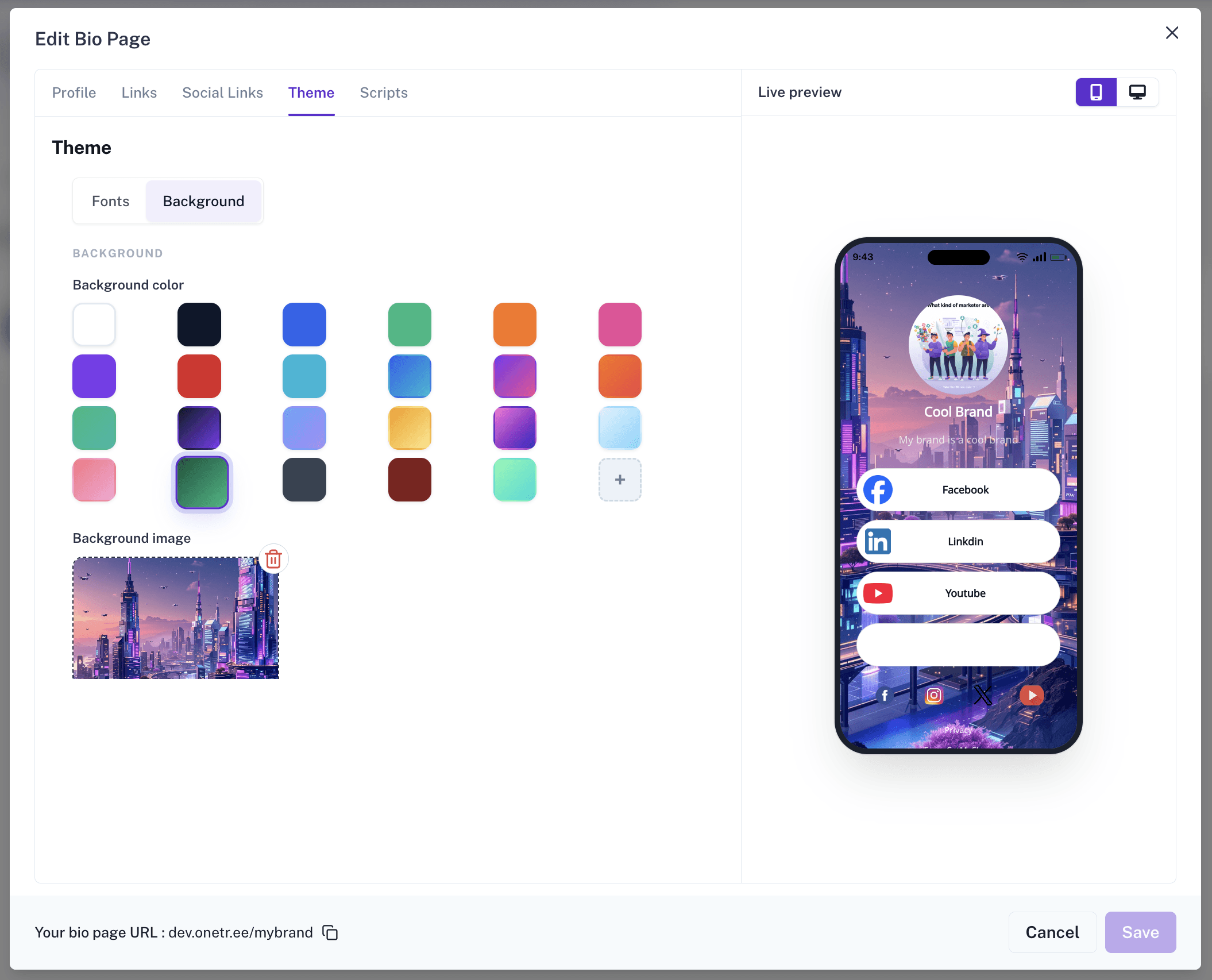
Open the Theme section to personalize your page.
You can customize:
- Font family
- Button style
- Border radius
- Font weight
- Background color
- Background image
This helps keep your Bio Link page aligned with your brand identity.
Example Theme Direction
For a SaaS brand, you may use:
- Clean font
- Soft background color
- Rounded buttons
- High-contrast call-to-action links
- Minimal layout with clear spacing
For a creator brand, you may use:
- More expressive colors
- A personal profile image
- Bold buttons
- A background image that matches the creator’s style
The goal is simple: your page should feel like your brand, not a generic link list.
Step 8: Add Tracking Scripts Optional
Open the Scripts section if you want to add custom tracking or functionality.
Common examples include:
- Google Analytics
- Google Tag Manager
- Facebook Pixel
- Custom JavaScript
This is useful when you want to measure campaign performance, retarget visitors, or connect your Bio Link page with your existing marketing stack.
Only add scripts that you trust and understand. Tracking scripts may affect privacy, compliance, and page behavior.
Step 9: Preview Your Page
Use the live preview panel to review your Bio Link page before publishing.
You can preview your page in:
- Mobile view
- Desktop view
This helps ensure your page looks good across devices.
Since many Bio Link visitors come from social media apps, your mobile view is especially important. Check spacing, button readability, image quality, and link order before saving.
Step 10: Save and Publish
Once your Bio Link page looks ready, click Save.
Your page is immediately ready to share.
You can continue editing it later if you want to update links, change the theme, add new campaigns, or remove outdated destinations.
Step 11: Share Through URL or QR Code
You can share your Bio Link page through:
- Direct URL
- Instagram bio
- LinkedIn profile
- X profile
- YouTube description
- Email signature
- Marketing campaigns
- WhatsApp messages
- Business cards
- Posters and offline materials
You can also generate and share a QR code directly from the Bio Link card beside the Edit button.
This is helpful for offline promotions, events, packaging, retail stores, restaurants, flyers, and print campaigns.
Understanding Bio Link Analytics
Creating a Bio Link page is only the beginning.
CutMe Short also provides analytics that help you understand how visitors interact with your page.
To view analytics, expand your Bio Link card from the dashboard.
Available Bio Link Metrics
| Metric | What It Means |
|---|---|
| Total Clicks | Total number of clicks generated across the Bio Link page |
| Bio Page Clicks | Number of visits to the Bio Link page itself |
| Custom Link Clicks | Number of clicks received by your custom links |
| Social Link Clicks | Number of clicks received by your social media profiles |
| Unique Visitors | Number of individual visitors who viewed your page |
| Social Link Performance | Engagement data for social platforms |
| Custom Link Performance | Performance of each custom destination link |
| Clicks Over Time | Traffic trends and audience activity over recent days |
These insights help you optimize your page and understand what resonates most with your audience.
How to Use Bio Link Analytics to Improve Results
Analytics are useful only when you act on them.
Here are a few simple ways to improve your Bio Link performance using CutMe Short analytics.
1. Move High-Performing Links Higher
If one link receives more clicks than others, move it closer to the top.
This makes it easier for new visitors to find the link that people already care about.
2. Remove Links That Do Not Get Clicks
Too many links can confuse visitors.
If a link is outdated or not getting clicks, remove it or move it lower.
3. Compare Social Link Engagement
Check which social profiles receive the most clicks.
This can help you understand where your audience wants to connect with you.
4. Track Campaign Spikes
Use clicks over time to identify which posts, campaigns, or promotions are driving traffic.
If a campaign creates a traffic spike, you can repeat the same style of promotion in the future.
5. Keep Testing Your Link Order
Your first three links usually matter the most.
Test different link orders and use analytics to see which arrangement performs better.
Bio Link Use Cases
One of the biggest advantages of a Bio Link page is flexibility.
Whether you are building a personal brand, growing a business, or running marketing campaigns, a single Bio Link page can become the central hub for everything important.
For Content Creators and Influencers
Creators often have content spread across multiple platforms.
Instead of asking followers to search for your latest YouTube video, newsletter, Instagram page, or affiliate recommendations, you can bring everything together in one place.
A creator could use a Bio Link page to showcase:
- Latest YouTube video
- Newsletter signup page
- Affiliate recommendations
- Instagram and X profiles
- Merchandise store
- Podcast episodes
- Brand collaboration form
This creates a smoother experience for followers while increasing visibility across all channels.
For Businesses and Startups
Businesses often need to send visitors to different destinations depending on their goals.
A SaaS company could use a Bio Link page to share:
- Product website
- Demo booking page
- Pricing page
- Customer case studies
- Blog resources
- LinkedIn company page
- Product launch announcements
Instead of constantly updating links across social platforms, everything stays accessible from one branded destination.
For Agencies and Consultants
Agencies frequently need to showcase credibility while making it easy for prospects to get in touch.
A Bio Link page can help centralize:
- Portfolio projects
- Client testimonials
- Case studies
- Discovery call booking link
- Contact information
- Service packages
- Lead generation forms
This makes it easier for potential clients to evaluate your services and take action.
For Events, Conferences, and Communities
If you are organizing an event, webinar, or community, a Bio Link page can act as a central information hub.
You can include:
- Registration page
- Event schedule
- Speaker information
- Community group links
- Post-event resources
- Sponsor links
- Feedback forms
This helps attendees find everything they need without searching through emails or social posts.
For Restaurants, Local Stores, and Offline Businesses
Bio Link pages are not only for creators and SaaS companies.
Local businesses can also use them to share:
- Menu links
- Google Maps location
- WhatsApp order link
- Instagram page
- Zomato or Swiggy page
- Offer pages
- Customer review links
- QR code-based campaigns
A Bio Link page can become a simple digital front desk for your offline business.
Best Practices for Better Results
To get the most value from your Bio Link page, follow these best practices.
Use a Professional Profile Image
Your image should be clear, recognizable, and aligned with your brand.
For businesses, use a logo. For creators, use a high-quality profile photo.
Choose a Memorable Slug
Your Bio Link slug should be easy to type, remember, and share.
Avoid long or confusing slugs.
Keep Your Branding Consistent
Use colors, fonts, and button styles that match your brand identity.
Consistency builds trust.
Place Important Links Near the Top
Visitors may not scroll through every link.
Put your highest-priority destination first.
Remove Outdated Links Regularly
Old campaigns, expired offers, and inactive pages can reduce trust.
Review your Bio Link page regularly.
Add Social Profiles for Credibility
Social links help visitors verify your presence across platforms.
This is useful for creators, businesses, agencies, consultants, and communities.
Track Performance Through Analytics
Use analytics to understand what people click, what they ignore, and what you should improve.
Use QR Codes for Offline Promotions
QR codes are useful for events, stores, packaging, posters, flyers, and business cards.
Bio Link Page SEO Checklist
Use this checklist before publishing your Bio Link page or blog post about it.
- Use a clear page title
- Add a short and useful description
- Include your brand or personal name
- Use clean and readable link titles
- Add links that match visitor intent
- Keep important links near the top
- Use descriptive image alt text
- Make sure the page works well on mobile
- Remove broken or outdated links
- Track link performance regularly
Bio Link Page AEO Checklist
AEO, or Answer Engine Optimization, helps your content become easier for AI search engines and answer engines to understand.
To make your Bio Link content more AEO-friendly:
- Use direct question-based headings
- Add short answers below important questions
- Define key terms clearly
- Use structured lists and tables
- Add FAQ sections
- Keep explanations simple
- Include examples
- Use consistent terminology
- Make the content helpful without requiring extra context
This blog is structured with direct answers, step-by-step instructions, use cases, and FAQs so both users and answer engines can understand it easily.
Frequently Asked Questions
What is a Bio Link page?
A Bio Link page is a simple landing page that contains multiple links under one shareable URL. It is commonly used in social media bios to share websites, products, social profiles, booking pages, newsletters, and other important destinations from one place.
Why should I use a Bio Link page?
You should use a Bio Link page if you want to share multiple destinations through one clean URL. It helps visitors find your most important content faster and helps you manage links from one central place.
Can I create a Bio Link page with CutMe Short?
Yes. CutMe Short lets you create a Bio Link page, add custom links, add social profiles, customize the design, share it with a URL or QR code, and track visitor engagement through analytics.
Can I customize my Bio Link page?
Yes. In CutMe Short, you can customize your Bio Link page theme, including font family, button style, border radius, font weight, background color, and background image.
Can I track clicks on my Bio Link page?
Yes. CutMe Short provides Bio Link analytics such as total clicks, Bio page clicks, custom link clicks, social link clicks, unique visitors, link performance, and clicks over time.
Can I share my Bio Link page with a QR code?
Yes. CutMe Short allows you to generate and share a QR code for your Bio Link page. This is useful for offline promotions, events, posters, packaging, and print materials.
Who should use a Bio Link page?
Bio Link pages are useful for creators, influencers, businesses, startups, agencies, freelancers, consultants, restaurants, communities, event organizers, and anyone who wants to share multiple links from one URL.
What should I add to my Bio Link page?
You should add your most important destinations, such as your website, product pages, booking link, social profiles, newsletter, lead form, latest content, campaign pages, and contact options.
Build Your Bio Link Page Today
Your audience should never struggle to find your content, products, services, or social profiles.
With CutMe Short Bio Links, you can create a professional branded destination, share it anywhere, monitor engagement, and continuously improve performance through analytics.
Whether you are a creator, marketer, agency, freelancer, consultant, local business, or startup, a Bio Link page can become one of the most valuable assets in your online presence.
Create your Bio Link page with CutMe Short and turn one simple URL into a complete digital hub.