
Introducing Link Rotator in CutMe Short: Split Traffic Across Multiple URLs
CutMe Short Link Rotator lets you distribute traffic across multiple URLs from one short link, making it easier to A/B test landing pages, compare offers, and optimize campaigns.
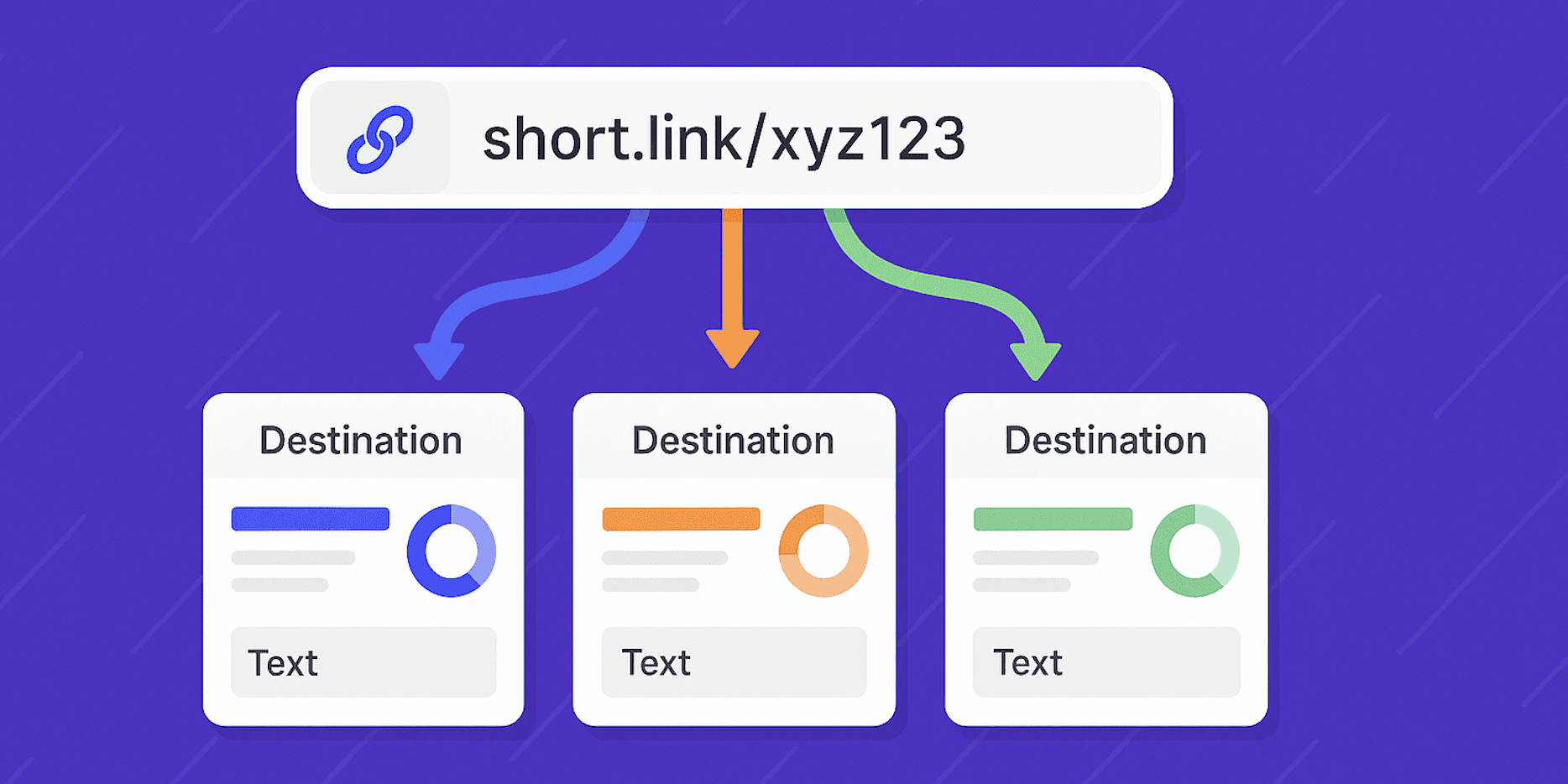
One short link does not always need to point to only one destination.
With Link Rotator in CutMe Short, you can use a single short link to send visitors to multiple destination URLs based on weighted random distribution.
This is useful when you want to test different landing pages, compare offers, split traffic between campaigns, or distribute visitors across multiple URLs without creating separate short links for every destination.
Instead of sharing five different links, you can share one clean short link and let CutMe Short rotate traffic behind the scenes.
Quick Answer
A Link Rotator in CutMe Short lets you redirect users to multiple destination URLs using one short link. You can add up to 5 destination URLs, assign traffic percentages to each destination, and let CutMe Short randomly send visitors based on those weights. If your percentages do not total 100%, the remaining traffic goes to the main destination URL.
What You Will Learn
By the end of this guide, you will know how to:
- Understand what a Link Rotator is
- Create a Link Rotator in CutMe Short
- Add multiple destination URLs to one short link
- Assign traffic percentages to each destination
- Understand weighted random distribution
- Use rotators for A/B testing and offer testing
- Understand sticky vs non-sticky rotation
- Avoid common setup mistakes
- Get better campaign insights using link rotation
What Is a Link Rotator?
A Link Rotator, also known as a URL Rotator, is a feature that lets one short link redirect users to multiple destination URLs.
Every time someone clicks your rotator link, CutMe Short automatically sends them to one of the predefined destinations based on your assigned traffic percentage.
For example, one short link like:
https://cme.sh/summer-offer
Can send traffic to multiple pages such as:
https://example.com/landing-page-a
https://example.com/landing-page-b
https://example.com/landing-page-c
This lets you test, compare, and distribute traffic without changing the public short link.
Why Use a Link Rotator?
Link Rotators are useful when you want to test multiple destinations while keeping your link sharing simple.
You can use CutMe Short Link Rotator to:
- A/B test multiple landing pages
- Try different affiliate links
- Compare promotional offers
- Distribute traffic across product pages
- Split test pricing pages
- Test campaign messaging
- Send traffic to different funnel pages
- Rotate between creator, partner, or influencer links
- Serve localized content when combined with targeting workflows
Common Link Rotator Benefits
| Benefit | Why It Matters |
|---|---|
| One link, multiple destinations | Share one clean URL while testing many pages |
| Better A/B testing | Compare landing pages or offers without changing the public link |
| Flexible traffic split | Decide how much traffic each destination should receive |
| Faster campaign testing | Update destinations without creating multiple short links |
| Better optimization | Learn which pages perform better over time |
| Cleaner promotion | Use one branded link across ads, emails, bios, and posts |
A rotator is especially helpful when you are not sure which landing page, offer, or destination will perform best.
How to Create a Link Rotator in CutMe Short
Setting up a Link Rotator in CutMe Short takes only a few clicks.
Step 1: Create a New Link or Edit an Existing Link
Open your CutMe Short dashboard.
You can either:
- Click Create Link to create a new short link
- Edit an existing link where you want to enable rotation
If you are creating a new link, start by entering your main destination URL.
Step 2: Add the Main Destination URL
Enter your primary destination URL.
This becomes the main URL for the short link.
Example:
https://example.com/main-offer
The main destination is important because it can also receive residual traffic if your rotation percentages do not add up to 100%.
Step 3: Open the Link Rotation Section
In the link creation or edit panel, scroll to the bottom section and open Link Rotation.
This is where you can add extra destination URLs and assign traffic percentages.
Step 4: Add More Destination URLs
Inside the Link Rotation section, add the additional URLs you want to include.
You can add up to 5 different destination URLs.
For each destination, add:
- Destination URL
- Traffic percentage
Example setup:
| Destination | Traffic Percentage |
|---|---|
| Main landing page | 50% |
| Landing page variation A | 25% |
| Landing page variation B | 25% |
You can now use one short link to send visitors across all these destinations.
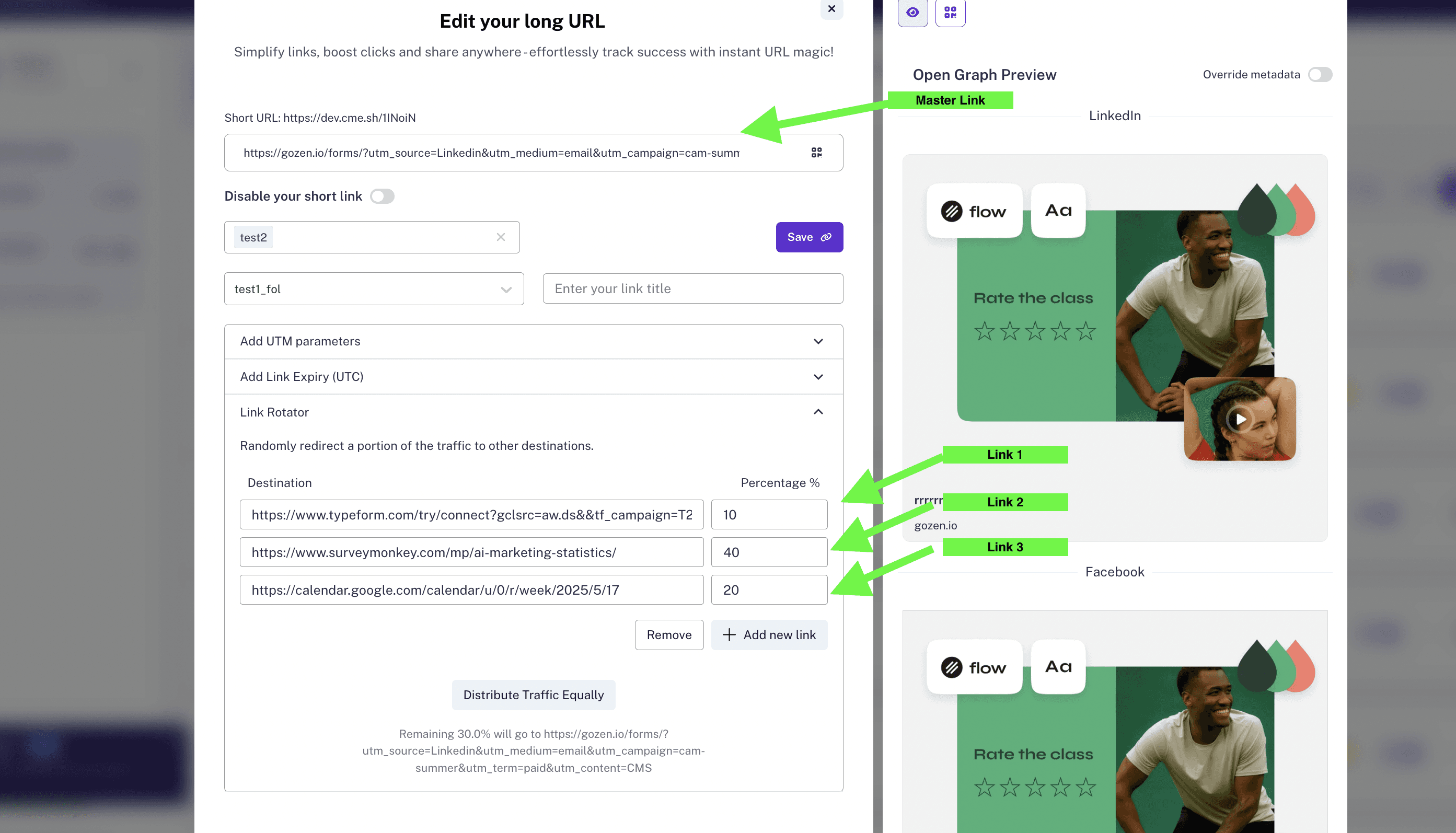
Step 5: Save Your Link
After adding your destinations and percentages, click Save.
Your short link is now a rotator link.
You can test it by clicking the short link multiple times. You may notice different destination pages opening on different clicks.
How Link Rotator Distribution Works
CutMe Short uses a weighted random distribution model.
Think of every click as drawing a card from a deck.
The percentage assigned to each destination increases or decreases the chance that the visitor will be sent to that page.
For example:
| Destination | Assigned Percentage | Expected Behavior |
|---|---|---|
| Page A | 70% | Most clicks should go here |
| Page B | 20% | Some clicks should go here |
| Page C | 10% | Fewer clicks should go here |
This does not mean that exactly 7 out of every 10 clicks will always go to Page A.
Because the system is probabilistic, results can vary in small samples.
Over a larger number of clicks, such as 100 or more, the distribution should become closer to your configured percentages.
What Happens If Percentages Do Not Total 100%?
Your rotation percentages do not have to total exactly 100%.
If your assigned percentages are less than 100%, the remaining traffic goes to the main destination URL.
Example:
| Destination | Assigned Percentage |
|---|---|
| Main URL | Remaining traffic |
| Offer A | 30% |
| Offer B | 30% |
In this case, 60% is assigned to Offer A and Offer B.
The remaining 40% goes to the main URL.
This is useful when you want your main destination to stay as the fallback while testing smaller percentages on other pages.
Minimum and Maximum Rotation Rules
Here are the key limits to remember:
| Rule | Details |
|---|---|
| Maximum destinations | Up to 5 destination URLs |
| Minimum percentage | 1% per destination |
| Percentage total | Does not need to equal 100% |
| Residual traffic | Goes to the main URL |
| Rotation type | Non-sticky random rotation |
These rules make Link Rotator flexible for both simple and advanced traffic testing.
Sticky vs Non-Sticky Rotation
CutMe Short's Link Rotator is non-sticky.
This means the system does not remember which destination a user visited earlier.
If the same user clicks the same rotator link multiple times, they may land on different destination URLs across different clicks.
What Non-Sticky Rotation Means
| Behavior | Explanation |
|---|---|
| User can see different pages | A repeat click may open a different destination |
| No fixed user assignment | The system does not permanently assign users to one variant |
| Better broad distribution | Traffic can be distributed more freely |
| Useful for simple testing | Good for broad campaign and offer comparisons |
Non-sticky rotation is helpful when your goal is to distribute traffic and compare destinations generally.
Example: A/B Testing Landing Pages
Imagine you want to test two landing pages for a product campaign.
You can create one short link:
https://go.yourbrand.com/product
And rotate traffic between:
https://example.com/product-page-a
https://example.com/product-page-b
Setup:
| Destination | Percentage |
|---|---|
| Product Page A | 50% |
| Product Page B | 50% |
Now you can share one link in ads, social posts, or emails while comparing how both pages perform.
Example: Testing Affiliate Offers
If you are promoting affiliate offers, you may want to test which offer gets more conversions.
Your rotator can distribute visitors across:
https://affiliate-offer-a.com
https://affiliate-offer-b.com
https://affiliate-offer-c.com
Setup:
| Destination | Percentage |
|---|---|
| Offer A | 40% |
| Offer B | 40% |
| Offer C | 20% |
This helps you compare offers while using one short link.
Example: Gradually Testing a New Page
You may not want to send all traffic to a new landing page immediately.
In that case, send a small percentage to the new page first.
Setup:
| Destination | Percentage |
|---|---|
| Main existing page | Remaining traffic |
| New landing page | 10% |
This lets you test the new page safely while keeping most traffic on your proven destination.
Best Practices for Using Link Rotator
Follow these best practices to get better results.
Start with a Clear Test Goal
Before creating a rotator, decide what you are testing.
Examples:
- Which landing page gets more signups?
- Which offer receives more clicks?
- Which pricing page performs better?
- Which campaign message drives better engagement?
A clear goal makes results easier to interpret.
Keep Destination Pages Similar
For fair A/B testing, compare pages that serve the same goal.
For example, test two demo booking pages against each other rather than testing a demo page against a blog post.
Use Simple Percentage Splits First
If you are new to link rotation, start with simple splits.
Examples:
50% / 50%
70% / 30%
80% / 20%
Once you understand how traffic behaves, you can test more complex splits.
Use Branded Short Links
If you are sharing rotator links publicly, use a branded domain where possible.
Example:
https://go.yourbrand.com/offer
Branded links look more trustworthy and professional.
Track Results Carefully
A rotator helps split traffic, but you still need to review performance.
Track:
- Clicks
- Conversions
- Engagement
- Bounce rate
- Sales
- Form submissions
- Campaign ROI
Use CutMe Short analytics and your destination analytics together for better decisions.
Test with Enough Clicks
Small samples can be misleading.
If you only get 10 clicks, the distribution may not look exactly like your percentages.
Larger samples give more reliable results.
Common Mistakes to Avoid
| Mistake | Why It Causes Issues | How to Fix It |
|---|---|---|
| Testing too many pages at once | Makes results harder to understand | Start with 2 or 3 destinations |
| Using unclear percentages | Traffic distribution becomes confusing | Use simple splits first |
| Comparing unrelated pages | Results are not meaningful | Test pages with the same goal |
| Expecting exact distribution immediately | Random systems vary in small samples | Review results after more clicks |
| Forgetting the main destination | Residual traffic goes to the main URL | Make sure the main URL is correct |
| Not tracking conversions | Clicks alone do not prove performance | Track downstream outcomes too |
Troubleshooting Link Rotator
Use this quick checklist if your rotator does not behave as expected.
| Issue | Possible Reason | What to Do |
|---|---|---|
| Same page opens multiple times | Rotation is random, not sequential | Click more times and test over a larger sample |
| Distribution does not match exactly | Small click sample | Review after 100+ clicks |
| Remaining traffic goes to main URL | Percentages do not total 100% | Increase percentages or keep main URL as fallback |
| A destination does not open | URL may be incorrect | Check and update the destination URL |
| User sees different pages on repeat clicks | Rotator is non-sticky | This is expected behavior |
| Too many variants are confusing | More destinations make testing harder | Reduce the number of destinations |
SEO Checklist for Rotator Links
If you are using rotator links in public campaigns, keep these points in mind:
- Use clear branded short slugs
- Choose a trustworthy custom domain
- Keep destination pages relevant to the same user intent
- Add UTM parameters where needed
- Avoid rotating between unrelated content
- Make sure every destination page is live
- Track performance beyond clicks
- Keep your main destination updated
- Review analytics before changing traffic split
AEO Checklist for This Guide
AEO, or Answer Engine Optimization, helps users and AI-powered search systems understand your content quickly.
This guide is structured with:
- A direct quick answer near the top
- Clear definition of Link Rotator
- Step-by-step setup instructions
- Tables for rules, examples, and troubleshooting
- FAQs with direct answers
- Simple explanations of weighted random distribution
- Practical examples for marketers, affiliates, and campaign teams
This makes the content easier to understand, summarize, and surface in answer-style search results.
Frequently Asked Questions
What is a Link Rotator?
A Link Rotator is a feature that lets one short link send visitors to multiple destination URLs based on assigned traffic percentages.
What is a URL Rotator?
A URL Rotator is another name for a Link Rotator. It rotates traffic between multiple URLs from one shared link.
How many URLs can I add to a CutMe Short Link Rotator?
You can add up to 5 destination URLs.
Can a user land on different URLs with each click?
Yes. CutMe Short Link Rotator is non-sticky, so each click is treated independently. A user may land on different destinations across multiple clicks.
What happens if my percentages do not total 100%?
If your assigned percentages do not total 100%, the remaining traffic goes to the main URL at the top of your list.
What is the minimum percentage I can assign?
You can assign as low as 1% per destination.
Is CutMe Short Link Rotator sticky?
No. CutMe Short's Link Rotator is non-sticky. It does not remember a user's previous destination.
Can I use Link Rotator for A/B testing?
Yes. Link Rotator is useful for A/B testing landing pages, offers, pricing pages, product pages, or campaign destinations.
Can I use Link Rotator with branded domains?
Yes. You can use Link Rotator with your CutMe Short links, including branded custom domains if they are connected to your account.
Why am I seeing the same destination again and again?
The rotator works on random probability, not a fixed sequence. In small samples, the same destination may appear multiple times. Over more clicks, distribution should become closer to your configured percentages.
Start Using Link Rotator Today
Link Rotator is now available inside CutMe Short.
With one short link, you can test, compare, and distribute traffic across multiple destinations.
Use it to:
- A/B test landing pages
- Compare offers
- Rotate affiliate links
- Test campaign pages
- Gradually send traffic to new pages
- Optimize marketing performance
Create your first Link Rotator in CutMe Short today and start learning which destination performs best.