
MCP Servers for Link Management: How AI Agents Can Run Your Marketing Pipeline
Quick answer
An MCP server lets an AI assistant like Claude or ChatGPT safely use a real tool on your behalf. Connect one for link management and an agent can create tracked short links, generate QR codes and pull click data as steps in a larger workflow, so a single instruction can drive a whole campaign from brief to report.

Most marketing teams already use AI to write: captions, subject lines, ad variations. The harder part has always been everything after the writing. Someone still has to create the tracking links, tag them correctly, make the QR code for the flyer, schedule the posts, then come back a week later to work out what actually performed.
That gap is closing quickly, and the main reason is a small, unglamorous standard called the Model Context Protocol, or MCP.
This guide explains what MCP is in plain language, why link management is one of the most useful things to connect to it, and what real AI-driven marketing workflows look like once you do. It's written to be useful whichever tools you use.
What is an MCP server, in plain English?
An AI model on its own can only talk. It can't see your dashboard or click a button. To do something, it needs a connection to a real system, and until recently every one of those connections was a one-off integration that someone had to build and maintain.
MCP is a shared standard for those connections. Anthropic introduced it in late 2024 as an open protocol. In December 2025 it was donated to the Agentic AI Foundation, a fund under the Linux Foundation co-founded by Anthropic, OpenAI and Block. It's now supported across the major AI clients, including Claude, ChatGPT, Gemini, Microsoft Copilot, VS Code and Cursor.
There are three pieces:
- The host: the AI app you're talking to, such as Claude, ChatGPT or an agent you've built.
- The MCP client: built into the host. It speaks the protocol.
- The MCP server: a small service that sits in front of a real product (your link shortener, CRM or email tool) and describes what the AI is allowed to do there.
A server exposes three kinds of things:
| Primitive | What it is | Link-management example |
|---|---|---|
| Tools | Actions the model can call | create_link, update_destination, get_link_stats |
| Resources | Read-only context the model can load | Your list of verified domains, your UTM naming rules |
| Prompts | Reusable, pre-written task templates | "Build a campaign link set for a product launch" |
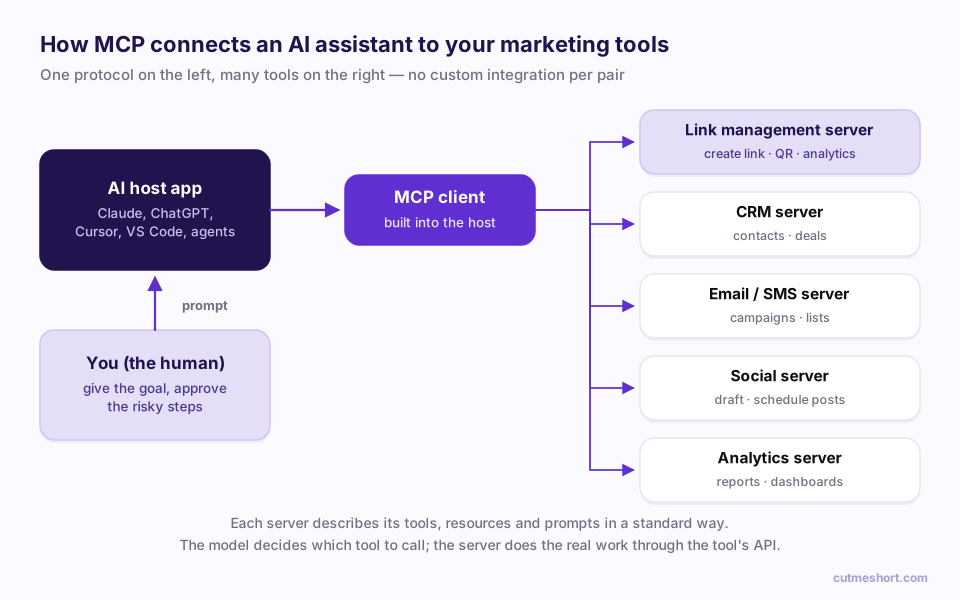
The important shift is on the right-hand side of that diagram. Any tool that ships an MCP server works with every MCP-compatible assistant, and every assistant can combine several servers in one task. That combination is where marketing automation gets interesting.
Why link management is a natural fit for MCP
Links are the connective tissue of a campaign. Almost every marketing action passes through one:
- An Instagram post needs a link in the bio or the story.
- A newsletter needs a tracked CTA.
- A printed flyer needs a QR code, and a QR code is a link.
- An influencer partnership needs one unique link per creator.
- A report needs the click data behind all of the above.
That makes a link platform a uniquely useful thing for an agent to control. It sits at the start of a campaign (creating the destinations people will click) and at the end (measuring what they did). Give an AI agent both ends and it can close the loop on its own.
There's a practical reason too. Link tasks are repetitive, rule-driven and easy to get slightly wrong: a misspelled utm_source, a link pointing at the staging site, a QR code made from the long URL instead of the short one. That's exactly the kind of work that benefits from an assistant that follows your conventions perfectly every time.
What a link-management MCP server can expose
Every platform decides its own tool list, but the useful capabilities tend to fall into the same groups. When you evaluate one, these are the questions worth asking.
Create and organise
- Create a short link from a destination URL, optionally on a branded custom domain and with a custom back-half (
go.yourbrand.com/spring-sale). - Apply titles, tags or folders so links stay findable.
- Create links in bulk from a list, for example one per influencer or one per store location.
Track
- Attach UTM parameters consistently (
utm_source,utm_medium,utm_campaign). - Read click counts, top countries, devices and referrers for a link or a whole campaign.
- On platforms that support conversion tracking, read leads and sales attributed to a link, not just clicks.
Control
- Change where a link points without changing the link itself, which is handy when a landing page moves.
- Disable or expire a link when an offer ends.
- Generate a QR code for print.
Coverage varies widely. Some servers start with a single "create link" tool and grow from there; others expose analytics and editing on day one. Check the tool list before you design a workflow around a capability.
Five AI marketing workflows you can actually build
Here's what this looks like in practice. Each example is something you'd type to an assistant that has a link-management server (and sometimes one or two others) connected.
1. The one-message campaign launch
"We're launching the spring sale on 1 April. Create tracked short links on our branded domain for Instagram, the newsletter and WhatsApp, all pointing to /spring-sale with the right UTM tags. Then make a QR code version for the in-store poster."
The agent creates four links with consistent naming, returns them in a table, and hands you a QR code. A 20-minute chore becomes one message, with fewer typos.
2. Influencer links at scale
"Here's a list of 40 creators. Give each one a unique short link to the product page, tagged with their handle, and put the list in a sheet."
With a spreadsheet or Google Drive server connected as well, the agent can write the results straight into a shared sheet for your partnerships team.
3. The Monday-morning report
"Compare last week's clicks across every link tagged
spring-sale. Which channel drove the most traffic, and did anything drop sharply?"
If the server exposes analytics, the agent reads the numbers and writes the summary. Connect a messaging server and it can post that summary to your team channel each week.
4. Link hygiene
"Find links in the
webinar-junefolder that still point to the registration page and switch them to the recording."
Updating a destination keeps every printed QR code and every old post working. The agent does in seconds what used to mean opening links one at a time.
5. The full loop: brief to optimisation
This is where the pieces combine: links, content, scheduling and measurement in one pipeline.
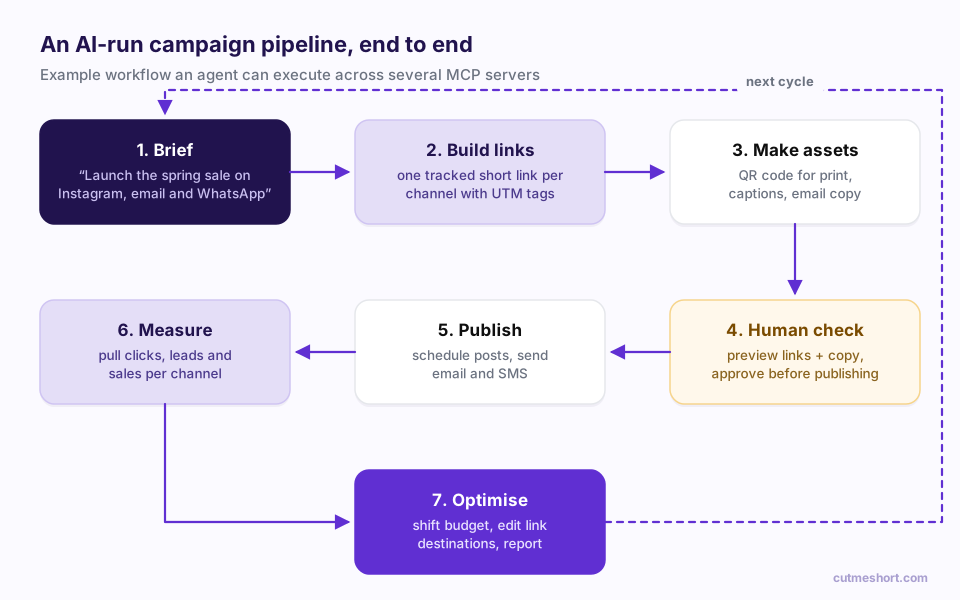
- Brief. You describe the goal once.
- Build links. The link-management server creates a tracked link per channel.
- Make assets. The model drafts captions and email copy; the link server produces the QR code.
- Human check. You review everything before anything goes public.
- Publish. Social and email servers schedule the posts and sends.
- Measure. The link server reports clicks, and leads or sales where supported, per channel.
- Optimise. The agent recommends where to shift effort, edits link destinations if needed, and writes the report. Then the cycle repeats.
Guardrails: how to let an agent work without losing control
Giving an AI the keys to live marketing assets deserves some care. These are the habits that separate a useful agent from a risky one.
Prefer OAuth over pasted API keys. The current MCP specification uses OAuth 2.1 for remote servers. You sign in with your normal account and approve a consent screen, and you can revoke the connection at any time. No long-lived secret ends up sitting in a chat history.
Ask for the narrowest scope. A server that only needs to create links shouldn't be able to delete your workspace. Good servers request specific scopes (for example "write links") rather than full account access.
Keep a human checkpoint before anything public. Creating a link is harmless; posting to 50,000 followers isn't. Most MCP hosts show a confirmation before each tool call. For publishing steps, keep that confirmation on.
Write your conventions down once. Agents follow rules well when the rules are explicit. Give the assistant your UTM naming convention, your default domain and your folder structure, ideally as a resource or a saved instruction, and you'll get consistent links every time.
Watch for prompt injection. If an agent reads web pages or inbound emails as part of a workflow, that content can contain instructions aimed at the AI. Treat outside content as data, and keep destructive tools behind approval.
Expect platform rules to still apply. A well-built server routes requests through the same validation as the product's dashboard, so plan limits, slug rules and domain verification behave identically. If a server lets an agent do something the dashboard wouldn't, that's a red flag.
A checklist for choosing a link-management MCP server
| Question | Why it matters |
|---|---|
| Is it a remote server (hosted URL) or local (runs on your machine)? | Remote servers work in web and mobile AI apps with no install. Local ones suit developers. |
| How does it authenticate? | OAuth sign-in with revocable access beats pasting API keys. |
| What scopes does it request? | Least privilege limits the damage if something goes wrong. |
| Does it support your custom domain? | Branded links earn more trust and clicks than generic ones. |
| Can it read analytics, or only create links? | Without read access, the agent can't close the measurement loop. |
| Does it report leads and sales, or only clicks? | Revenue attribution is what turns a report into a decision. |
| Are errors readable? | "Slug already taken" lets the agent recover; a bare "400" doesn't. |
| Does it respect plan limits like the dashboard does? | Prevents surprise overages and inconsistent behaviour. |
Where this is heading
MCP has moved fast: from a single-vendor proposal to a neutral, foundation-governed standard backed by every major AI lab, in about a year. For marketers, the practical upshot is simple. The tools you already use are becoming things your AI assistant can operate directly.
The teams that benefit most won't be the ones with the cleverest prompts. They'll be the ones whose foundations are tidy: one branded domain, consistent UTM conventions, links organised by campaign, and measurement that goes beyond clicks. Those are exactly what an agent needs to do good work, and they're worth putting in place now, whichever link platform you use.
Frequently asked questions
What does MCP stand for?
MCP stands for Model Context Protocol. It's an open standard that lets AI applications connect to external tools and data sources in a consistent way, so one integration works across many AI assistants.
Do I need to be a developer to use an MCP server?
Not for remote servers. In most AI apps you add a connector by pasting the server's URL (or picking it from a directory), then sign in to the tool and approve access. Local servers usually need a small amount of setup and suit developers better.
Is it safe to let an AI agent create and edit my links?
It can be, with the right setup: OAuth sign-in instead of shared API keys, narrow permission scopes, and confirmation before any public or destructive action. Start with low-risk tasks like creating and reporting on links before you automate publishing.
What's the difference between an MCP server and an API?
An API is how software talks to a product. An MCP server sits in front of that API and describes it to an AI model, saying which actions exist, what inputs they need and what they return, in a standard format any MCP-compatible assistant understands.
Which AI assistants support MCP?
Support is now broad. Claude, ChatGPT, Gemini, Microsoft Copilot, and developer tools like VS Code and Cursor all support MCP connections in some form. The exact setup steps differ by app and plan.
Can an AI agent measure campaign ROI through MCP?
Only if the connected tools expose that data. A link-management server that reports clicks lets an agent measure traffic. One that also reports attributed leads and sales lets it measure revenue, which is what you need to judge ROI.