
How to Track Shopify Sales From Your Short Links With the CutMe Short App
Quick answer
To track Shopify sales from your short links, install the CutMe Short app in Shopify, click Connect and approve access to your CutMe Short workspace, then enable the Analytics Script app embed in your theme editor. Finally, switch on Track leads & sales for the links that point to your store. Each new order is then credited to the short link the shopper clicked, with its total and currency, in CutMe Short Events.
You share your store everywhere: Instagram bio, TikTok videos, influencer posts, email campaigns, QR codes on packaging. Shopify tells you that orders came in. It's much less clear which of those links actually sold something.
The CutMe Short app for Shopify answers that. It connects your store to your CutMe Short workspace, so every order is credited to the short link the shopper clicked, with the order value, in the same Events dashboard as your clicks.
No code is needed. Setup takes about ten minutes.
How it works
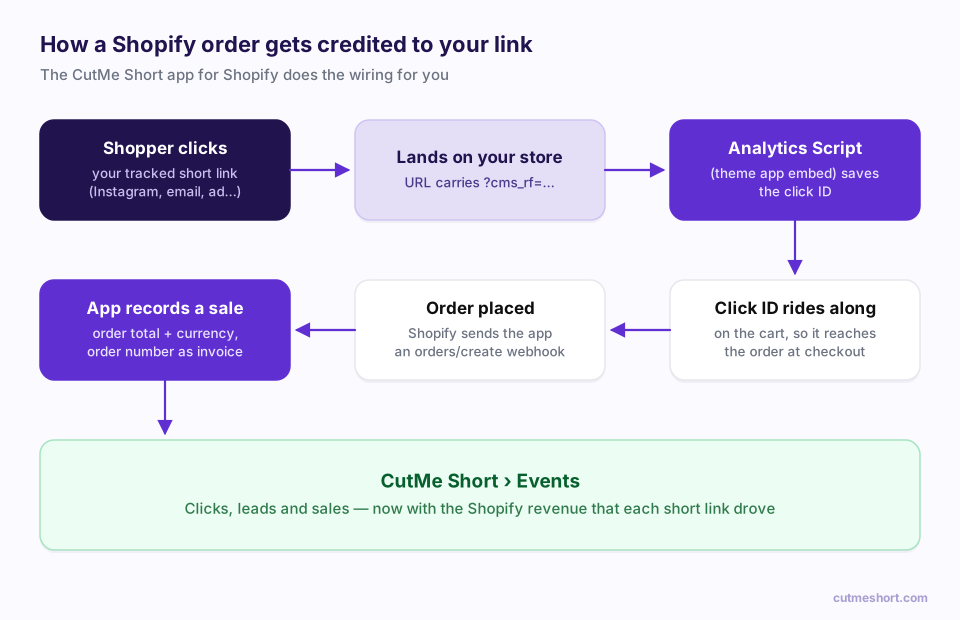
- A shopper clicks one of your tracked short links, say in an influencer's Instagram story.
- They land on your store with a click ID in the URL.
- The app's Analytics Script saves the click ID and attaches it to the shopper's cart.
- When they place an order, Shopify notifies the app.
- The app records a sale in CutMe Short with the order's total and currency, using the order number as the invoice ID.
- In Events, you see the revenue next to the link that earned it.
Before you start
- A Shopify store, and permission to install apps and edit its theme.
- A CutMe Short workspace on a plan that includes lead and sale tracking, where you're an owner or admin.
- Short links pointing to your store. Branded ones, like
shop.yourbrand.com/summer, are best.
Step 1: Install the app and click Connect
- Install the CutMe Short app for Shopify, from the Shopify App Store or the install link our team shares with you.
- In your Shopify admin, open Apps → CutMeShort.
- In the CutMeShort account section, you'll see "No workspace connected". Click Connect.
Step 2: Approve access to your CutMe Short workspace
You'll be taken to CutMe Short. Log in if asked, and you'll see Connect Shopify to CutMeShort.
- Review what the app is asking for:
- View your short links and their settings (read only)
- View basic workspace details (read only)
- Record sale and conversion events (can write)
- Under Select a workspace, open Choose a workspace and pick the workspace your store's links live in. Only workspaces where you're an owner or admin appear.
- Click Allow access.
You'll see Successfully connected! Click Return to Shopify; it also returns automatically after a few seconds. Back in Shopify, the app now says Connected to followed by your workspace name.
Each Shopify store connects to one CutMe Short workspace. To switch workspaces later, click Disconnect in the app and connect again.
Step 3: Turn on the Analytics Script in your theme
This is the step people most often miss. Without it, orders can't be matched to clicks.
- In Shopify admin, go to Online Store → Themes.
- Next to your live theme, click Customize.
- In the theme editor, open App embeds (in the left sidebar).
- Find Analytics Script from CutMe Short and switch it on.
- Click Save.
You can adjust two settings here:
| Setting | Default | What it does |
|---|---|---|
| Attribution window (days) | 60 | How long after a click an order can still be credited to it |
| Attribution model | Last touch | Last touch credits the most recent link clicked; First touch credits the first |
Pick a window that matches how long your customers take to buy. For impulse products, 7–30 days is plenty. For considered purchases, keep the default of 60.
Step 4: Switch on tracking for your store links
In CutMe Short, open Links and turn on Track leads & sales for every link that points to your store. Only links with tracking on pass the click ID to your store.
Links created before you set up the app need tracking switched on too. Check your Instagram bio link, influencer links and QR code links first, since they're usually the ones sending the most shoppers.
Step 5: Test with a real order
- Open one of your tracked links in a private browser window.
- Check that the store URL contains
?cms_rf=. - Add something to the cart and complete a checkout. A low-cost product or a 100% discount code works well for testing.
- In CutMe Short, open Events and click the sales tab. Your test order should appear with its order number as the Invoice ID and its total as the Amount.
What gets tracked
| What | When | Details |
|---|---|---|
| Click | Every click on a tracked link | Link, time, location, device, browser and referrer |
| Lead | Once per customer | Recorded for the customer when they first order, or when a signed-in customer arrives through a tracked link |
| Sale | Once per order | Order total (including tax and shipping), the order's currency, and the order number as the invoice ID |
Guest checkouts are tracked too; the order is recorded against a customer ID based on the order.
Revenue from different currencies is converted to US dollars, so it all adds up in one dashboard.
What you can do with it
- Pay influencers on results. Give every creator their own short link and compare the revenue each one drives, not just their clicks.
- Find your best channel. Use one link per channel, such as
shop.brand.com/drop-ig,-ttand-email, for the same product drop. - Measure offline campaigns. Put a tracked short link behind the QR code on packaging, flyers or event signage and see the orders it brings in.
- Check the value of AI and community traffic. When your links are shared in forums, newsletters or AI-cited articles, see whether those visitors buy.
Good to know
- Refunds and order edits aren't tracked. The sale is recorded when the order is created, at its original total. If you refund an order, the original sale stays in Events.
- The theme app embed is required. If Analytics Script is switched off, or you change your live theme, orders can't be matched to clicks. Re-enable it in the new theme.
- Custom checkouts. Orders placed outside the normal storefront cart, for example some headless or Buy Button setups, may be recorded without being linked to a click.
- Cross-device journeys. Attribution works within one browser. If a shopper clicks on their phone and buys on their laptop, the sale won't be linked to that click.
Disconnecting
In Shopify admin, open Apps → CutMeShort and click Disconnect. Uninstalling the app also disconnects it. Sales already recorded stay in your CutMe Short Events dashboard.
Frequently asked questions
Do I need a developer to track Shopify sales with CutMe Short?
No. Install the app, connect your workspace, switch on the Analytics Script app embed and turn on tracking for your links. No code is needed.
Why aren't my Shopify orders showing up in Events?
Check three things: the Analytics Script app embed is on and saved in your live theme; the link the shopper clicked has Track leads & sales switched on; and the store is connected to the right workspace (Connected to … in the app).
Does the order amount include tax and shipping?
Yes. The sale is recorded at the order's total, including tax and shipping, in the order's currency, and converted to US dollars for reporting.
Are refunds subtracted from revenue?
No. Sales are recorded when the order is created, and refunds or later order edits aren't tracked.
Can I connect more than one store?
Yes. Install the app in each store and connect each one to a CutMe Short workspace. Each store connects to one workspace at a time.